

A website is a collection of connected web pages and digital content that people can access through the internet using a web browser. Websites can be used to share information, sell products, provide services, publish content, build communities, or help people complete tasks online. In this guide, we’ll explain how websites work, the main parts they need, the different types of websites, and what businesses should know before creating one.
What Is a Website?
A website is a group or related web pages, files, images, and other digital content that are connected under a common domain name and mad available on the internet. When someone enters a website address into a browser, the browser requests the required files from a web server and displays the website on the user’s screen.
Websites serve many different purposes. A company may use one to explain its services and attract potential customers, while an online store may use a website to display products and process orders. Blogs publish articles and educational content, portfolios showcase creative work, and web applications allow people to perform specific tasks online.
Although websites can look very different fron one another, they generally rely on the same basic building blocks: a domain name, web hosting, a server, website files, and a web browser. Understanding how these pieces work together makes it much easier to understand how websites are created and why they are important.
How Does a Website Work?
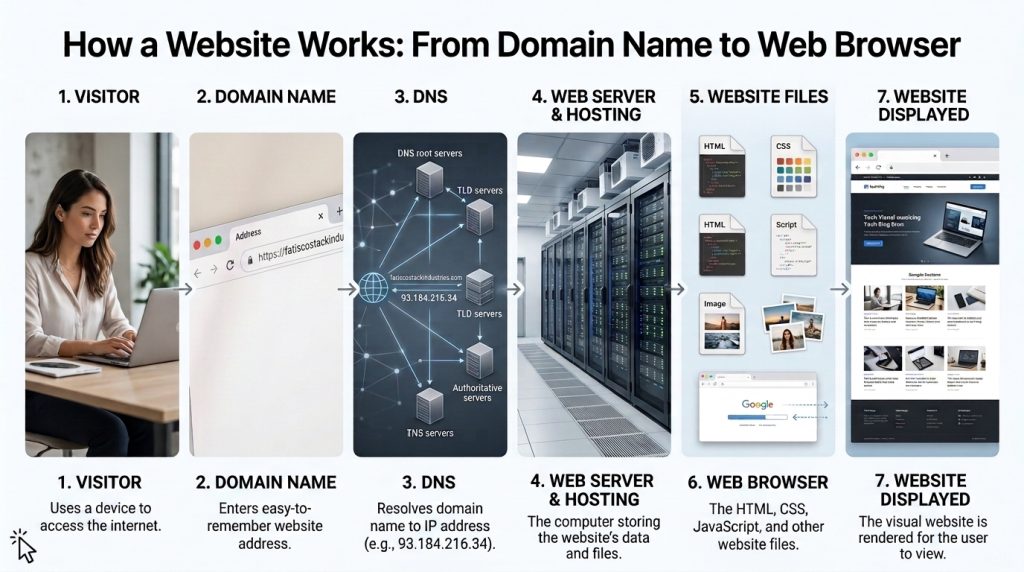
When you visit a website, several things happen in the background within a matter of seconds. You enter a domain name or click a link, your browser finds the server where the website is hosted, the server sends the necessary files back to your browser, and the browser turns those files into the web page you see on your screen.
Think of it as a simple chain: the domain name tells your browser which website you want to visit, DNS helps find the correct server, web hosting provides a place for the website’s files to live, and the web server delivers those files to your browser. Your browser then processes the files and displays the finished website.
For example, when someone types fatiscostackindustries.com into a browser, the browser needs to locate the server responsible for that domain. Once the connection is established, the server sends the website’s resources to the browser, which loads the page and allows the visitor to interact with it.
What Are the Main Parts of a Website?
A website is made up of several components that work together to make it accessible, functional, and useful. While the technology behind modern websites can become complex, the basic parts are easier to understand when you look at them individually. The most important components include the domain name, web hosting, web servers, website files and content, and the web browser used to access the site.
1. Domain Name
A domain name is the human-readable address people use to access a website on the internet. For example, fatiscostackindustries.com is a domain name. Instead of asking visitors to remember numerical IP address, the domain gives them a simple and recognizable way to find your website.
A domain name usually consists of a name and a domain extension, such as .com, .org, or .net. Businesses often choose a domain that closely matches their brand because it makes the website easier to remember and can contribute to a professional online presence.
2. Web Hosting
Web hosting is the service that provides the storage and infrastructure needed to make a website available online. Your website’s files, images, databases, and other resources need to be stored somewhere so that visitors can access them whenever they visit your domain.
Different hosting solutions are designed for different needs. A small website may work well with shared hosting, while a growing business or high-traffic application may require a virtual private server, dedicated infrastructure, or cloud hosting. The right choice depends on factors such as traffic, performance requirements, security, scalability, and budget.
3. Web Server
A web server is the system responsible for receiving requests from visitors’ browsers and delivering the files and resources needed to display a website. When someone visits a web page, the server processes the request and sends the appropriate content back to the browser.
Web servers can also handle other tasks, such as processing requests, managing connections, and communiting with databases or application software. This is one reason why a website can be much more than a collection of static pages.
4. Website Files and Content
Website files are the individual files and resources that make up a website. Depending on how the website is built, these can include HTML, CSS, JavaScript, images, videos, fonts, and other files. Together, these resources determine what visitors see and how the website behaves when they interact with it.
The content itself is equally important. Text, images, videos, product information, articles, and other media give a website its purpose and help visitors understand what a business, organization, or individual has to offer. A technically well-built website still needs useful and relevant content to provide a good experience.
5. Web Browser
A web browser is the software people use to access and interact with websites. Poplar browsers include Google Chrome, Microsoft Edge, Safari, Firefox, and others. When you enter a website address or click a link, the browser sends a request to the appropriate server and processes the information it receives.
The browser interprets the website’s files and presents them as a visual page that you can read and interact with. This is why the same website can be accessed from different devices, including computers, smartphones, and tablets, although the appearance may change depending on the screen size and how the website was designed.
| Website Component | What It Does |
| Domain Name | Gives people a memorable address for finding a website. |
| Web Hosting | Provides storage and infrastructure for website files and resources. |
| Web Server | Receives requests and delivers the resources needed to load a website. |
| Website Files and Content | Provide the structure, appearance, functionality, and information visitors see. |
| Web Browser | Requests, processes, and displays website content for the visitor. |
What Is the Difference Between a Website and a Web Application?
A website primarily provides information or content that visitors can read, view, or explore, while a web application is designed to let users perform specific tasks or interact with data through a browser. The difference is not always absolute, because many modern websites combine informational pages with interactive features and application-like functionality.
For example, a company’s website might contain pages explaining its services, introducing its team, and providing contact information. An online banking platform, on the other hand, is a web application because users can log in, view account information, transfer money, and perform other tasks.
| Website | Web Application |
| Primarily focuses on providing information or content. | Primarily focuses on user interaction and completing tasks. |
| Visitors mainly read, view, or navigate content. | Users actively enter data and interact with features. |
| Examples include blogs, company websites, and portfolios. | Examples include online banking, project management tools, and customer dashboards. |
| May have limited interactive features. | Usually has more complex functionality and user interactions. |
The distinction matters when planning a digital project because the technology, development process, security requirements, and ongoing maintenance can be very different. A simple business website may only need a content management system and reliable hosting, while a complex web application may require custom software development, databases, APIs, authentication systems, and more advanced infrastructure.
What Are the Different Types of Websites?
Websites come in many forms, and the type of website a person or business needs depends on its goals. Some websites are built mainly to provide information, while others are designed to sell products, publish content, showcase work, generate leads, or provide online services. Understanding these different types makes it easier to choose the right approach when planning a new website.
1. Business Websites
A business website gives a company a professional presence online and helps potential customers understand what the business offers. It may include information about products or services, an About page, contact details, customer testimonials, frequently asked questions, and other resources that help visitors make informed decisions.
For many businesses, a website also acts as a central point for marketing activities. Visitors may arrive through Google search, social media, online advertising, email campaigns, or referrals and use the website to learn more or contact the business.
2. eCommerce Websites
An eCommerce website allows businesses to sell products or services online. Customers can browse products, view prices and descriptions, add items to a shopping cart, and complete purchases through an online checkout process.
Modern eCommerce websites can also include features such as product reviews, customer accounts, subscriptions, payment processing, order tracking, inventory management, and personalized recommendations. Platforms such as Shopify and WooCommerce are commonly used to build and manage online stores.
3. Blogs and Online Publications
Blogs and online publications are websites built primarily around regularly published content. Articles may cover topics such as business, technology, education, health, travel, finance, or personal experiences.
Businesses can also use blogs as part of their content marketing strategy. By publishing genuinely useful information that answers questions their audience is searching for, a business can attract visitors, demonstrate expertise, and create opportunities for people to discover its products or services.
4. Portfolio Websites
A portfolio website is designed to showcase a person’s skills, experience, projects, or creative work. Designers, developers, photographers, writers, architects, consultants, and other professionals often use portfolio websites to demonstrate what they can do.
Instead of simply describing their abilities, professionals can use a portfolio to present real examples of previous work, explain their process, and give potential clients or employers a clearer understanding of their capabilities.
5. Service-Based Websites
A service-based website is created for businesses or professionals who sell services rather than physical products. Examples include web development agencies, marketing companies, consulting firms, law firms, construction companies, and professional service providers.
These websites typically focus on explaining the services available, demonstrating expertise, building trust, and encouraging visitors to take an action such as requesting a quote, booking a consultation, or making contact.
6. Membership and Community Websites
Membership and community websites provide content, resources, or online experiences to registered users. Some are free to join, while others require a subscription or membership fee.
These websites may include private content, discussion forums, member profiles, online courses, events, or other features that are available only to registered users.
7. Web Applications
Web applications are interactive online platforms that allow users to perform tasks directly through a web browser. Examples include online banking platforms, project management systems, customer relationship management tools, booking systems, and business dashboards.
Unlike a simple informational website, a web application typically requires more complex functionality and may rely on databases, user authentication, APIs, and backend systems to operate.
These categories are not mutually exclusive. A single business can have a website that combines several of these functions. For example, an eCommerce business may have an online store, a blog, customer accounts, and a private membership area all within the same digital ecosystem. The most important consideration is not choosing a category for its own sake, but building a website that supports the specific goals and needs of its audience.
What Is the Difference Between a Website and an Online Store?
A website is primarily designed to provide information, build credibility, showcase services, or help people learn about a business. An online store, on the other hand, is built to sell products or services online and includes features such as product pages, shopping carts, checkout, and payment processing. An online store is a type of website, but not every website is an online store.
A website and an online store may look similar at first, but they are built with different primary goals in mind. A traditional business website might introduce a company, explain its services, showcase its work, answer customer questions, and provide contact information. Its main purpose is often to help visitors understand the business and decide whether they want to work with it.
An online store is designed around transactions. It allows customers to browse products or services, view prices, add items to a cart, complete checkout, and make payments online. Depending on the platform, it may also include features for managing inventory, shipping, taxes, customer accounts, discounts, and order tracking.
For example, imagine a clothing brand that has a website with pages such as Home, About Us, Services, and Contact. Visitors can learn about the company, but they cannot purchase anything directly from the website. That is a business website.
Now imagine another clothing brand where visitors can browse shirts, dresses, and trousers, select sizes and colors, add products to a shopping cart, enter their shipping information, and pay online. That is an online store.
The key difference is therefore not simply how the website looks. It is what the website is designed to help the visitor do.
You can use this simple comparison:
Traditional Website
- Focuses on information and brand presence
- Showcases services, expertise, or portfolio work
- Helps visitors learn about a business
- Usually directs visitors to contact the business
- May not include online purchasing
Online Store
- Focuses on selling products or services
- Includes product or service pages
- Uses shopping cart and checkout functionality
- Accepts online payments
- Can manage orders, customers, inventory, and shipping
For businesses that need both information and online sales, the two approaches can work together. An online store can have an About Us page, blog, service information, FAQs, and other educational content just like a traditional website. The difference is that it also provides the infrastructure needed to complete transactions online.
The right choice depends on what you want your website to accomplish. If your primary goal is to establish an online presence and help potential customers understand your business, a traditional website may be enough. If you want customers to purchase products or services directly through your website, you will need e-commerce functionality.
This is also where the choice of website platform becomes important. Different platforms are designed for different needs, and choosing the right one can affect how easily you manage your website, publish content, sell online, and grow your business.

What Are the Different Types of Websites?
The most common types of websites include business websites, online stores, blogs, portfolio websites, membership websites, educational websites, nonprofit websites, and web applications. Each type is built for a different purpose, so the right choice depends on what you want your website to help you achieve.
Not every website is built for the same reason. Some websites are created to introduce a business and generate leads, while others are designed to publish articles, showcase creative work, sell products, or provide online services.
Understanding the different types of websites can help you determine what you actually need before spending money on design or development. A small business that only needs customers to learn about its services will have very different requirements from an online retailer that needs to process hundreds of orders every month.
Here are some of the most common types of websites.
Business Websites
A business website gives a company a professional presence online and helps potential customers understand what the business does.
It typically includes pages such as Home, About, Services, Contact, and sometimes a Blog or Resources section. Depending on the business, it may also include testimonials, case studies, booking systems, quotation forms, or other tools that help turn visitors into customers.
A business website is often the starting point for companies that want to build credibility and make it easier for people to discover and contact them online.
Online Stores
An online store, also called an e-commerce website, is designed to sell products or services over the internet.
Customers can typically browse products, view prices, select variations, add items to a shopping cart, and complete a checkout process. More advanced stores may also include customer accounts, inventory management, shipping options, discount codes, subscriptions, and automated order notifications.
Platforms such as Shopify and WooCommerce are commonly used to build and manage online stores.
Blog Websites
A blog is a website or section of a website that regularly publishes written content, usually organized by date, category, or topic.
Blogs are commonly used by individuals, businesses, publishers, and organizations to share information, educate an audience, discuss industry topics, or attract visitors from search engines.
For businesses, a well-planned blog can also support SEO by creating useful content around the questions and topics their potential customers are already searching for.
Portfolio Websites
A portfolio website is designed to showcase someone’s work, skills, experience, or creative projects.
Photographers, designers, developers, writers, architects, artists, and other professionals often use portfolio websites to demonstrate what they can do.
Instead of simply telling visitors that they are good at their work, a portfolio allows them to show examples of that work directly.
Membership Websites
A membership website restricts some or all of its content to registered users.
Visitors may need to create an account or pay for a membership before accessing specific content, resources, courses, communities, or other features.
Membership websites are often used for online communities, premium content platforms, professional networks, and subscription-based services.
Educational Websites
Educational websites are built to provide learning materials, courses, training, or other educational resources.
They can range from simple websites that publish educational articles to sophisticated learning platforms that include video lessons, quizzes, student accounts, certificates, progress tracking, and instructor dashboards.
Nonprofit and Organization Websites
Nonprofit organizations, charities, associations, and community groups often use websites to explain their mission, share updates, attract supporters, collect donations, and provide information about their activities.
These websites are usually focused on communication, awareness, fundraising, and community engagement.
Web Applications
A web application is more interactive than a traditional informational website. Instead of simply reading information, users actively perform tasks within the application.
Examples include online banking platforms, project management tools, customer dashboards, booking systems, SaaS platforms, and other browser-based applications.
Web applications often require more advanced development because they may involve user authentication, databases, APIs, payments, real-time functionality, and complex business logic.
Landing Pages
A landing page is a focused web page designed around a specific goal.
That goal might be collecting leads, promoting a product, encouraging someone to book a consultation, registering users for an event, or driving sales from an advertising campaign.
Unlike a large business website with many pages and navigation options, a landing page is usually designed to guide visitors toward one primary action.
Can a Website Belong to More Than One Category?
Yes. A single website can combine multiple types of functionality.
For example, a business might have a website with an About page, service pages, a blog, and an online store. Another company might combine a blog with a membership community, while a software company might have a marketing website connected to a web application.
The important thing is to identify the primary purpose of the website and then add the features that support that purpose.
Choosing the right website type at the beginning can make future development easier. It can also help you determine the right platform, hosting requirements, content strategy, SEO approach, and budget.
For that reason, before building a website, it is worth asking a simple question: What do I actually want this website to help my business or organization accomplish?
That question should guide almost every decision that follows.

What Do You Need to Build a Website?
To build a website, you generally need a domain name, web hosting, a website platform or content management system, a design, content, and the functionality required for your goals. Depending on the project, you may also need professional web development, security tools, SEO, analytics, and ongoing maintenance.
Building a website involves more than simply choosing a design and putting it online. Behind every functioning website are several different components working together.
The good news is that you do not always need to understand the technical details of every component before creating a website. However, knowing what each part does can help you make better decisions, avoid unnecessary expenses, and understand what you are actually paying for when hiring a professional.
Here are the main things a website typically needs.
A Clear Purpose
Before choosing a platform or purchasing a domain, you need to know what the website is supposed to accomplish.
Are you trying to generate leads for a service business? Sell products online? Showcase your professional work? Publish educational content? Build an online community?
Your answer will influence almost every decision that follows.
A website designed to sell physical products will need different features from a portfolio website. A website for a local service business may need booking and contact forms, while a software company may need a customer dashboard and account system.
The clearer your goal is, the easier it becomes to determine what you actually need.
A Domain Name
A domain name is the address people type into a browser to visit your website.
For example, fatiscostackindustries.com is a domain name.
Your domain is an important part of your online identity because it is often one of the first things people associate with your business. A good domain should ideally be easy to remember, easy to spell, and relevant to your brand.
You typically register a domain through a domain registrar, and you renew the registration periodically to keep ownership of the domain.
Web Hosting
Web hosting is the service that provides the server resources needed to store and deliver your website’s files to visitors.
When someone enters your domain into a browser, the browser needs to retrieve your website’s files from a server. Web hosting provides the infrastructure that makes this possible.
The type of hosting you need depends on the size and complexity of your website. A small business website may have very different hosting requirements from a high-traffic online store or a web application.
A Website Platform or Content Management System
A website platform provides the tools and technology used to create and manage your website.
A content management system, commonly called a CMS, allows you to create and manage content without necessarily having to code every page from scratch.
WordPress is one example of a CMS. Shopify is another platform commonly used for e-commerce. Other platforms are designed around website building, online stores, or specific business needs.
The best platform depends on what you are building, how much control you need, your technical experience, and how you expect the website to grow.
Website Design
Your website needs a visual structure that makes it easy for visitors to understand your business and navigate through your content.
Design includes elements such as:
- Layout
- Typography
- Colors
- Images
- Buttons
- Navigation
- Spacing
- Mobile responsiveness
- Visual hierarchy
Good design is not simply about making a website look attractive. It should also help visitors find information quickly and understand what action they should take next.
Content
A website needs useful content.
This includes the words visitors read, the images they see, videos they watch, and other information that helps them understand your business.
For a typical business website, content might include:
- A clear homepage message
- An About page
- Service or product descriptions
- Contact information
- Frequently asked questions
- Customer testimonials
- Case studies
- Blog articles
Content also plays an important role in SEO, AEO, and GEO because search engines and AI systems need clear, useful information to understand what your website is about.
Functionality
The functionality your website needs depends on its purpose.
A simple business website might only need a contact form. An online store may need product management, shopping carts, payment processing, shipping calculations, and order management.
Other websites may require:
- Appointment booking
- Customer accounts
- Membership systems
- Search functionality
- Online payments
- Email subscriptions
- Live chat
- API integrations
- Customer dashboards
The more functionality a website requires, the more important the underlying technical architecture becomes.
Security
Website security should not be treated as an optional extra.
A website should use HTTPS, keep its software and plugins updated, use secure authentication practices, and have appropriate protection against common security threats.
For websites that collect personal information or process payments, security becomes even more important.
Website owners should also maintain reliable backups so that the site can be restored if something goes wrong.
SEO and Search Visibility
A website can be beautifully designed and technically functional but still receive very little traffic if people cannot find it.
Search engine optimization helps search engines understand your website and its content so that relevant pages can appear when people search for related topics.
This includes technical SEO, content optimization, internal linking, structured data, page performance, and other factors.
For a modern website, SEO should ideally be considered during the planning and development process rather than added as an afterthought.
Analytics and Measurement
Website analytics help you understand what visitors are doing.
Depending on your setup, analytics can show information such as how many people visit your website, which pages they view, where visitors come from, and what actions they take.
This information can help you identify what is working and where improvements may be needed.
For example, if many visitors arrive on a service page but very few contact the business, that may indicate an opportunity to improve the page’s content, design, offer, or call to action.
Ongoing Maintenance
Launching a website is not necessarily the end of the process.
Websites often need ongoing maintenance to remain secure, functional, and up to date. This can include software updates, backups, security monitoring, content updates, performance improvements, broken-link checks, and technical fixes.
The amount of maintenance required depends on the type of website and the technology behind it.
A simple informational website may require relatively little maintenance, while an e-commerce platform or web application may require regular technical attention.
Do You Need All of These Things to Build a Website?
Not every website needs the same level of investment or technical complexity.
A simple personal website may only require a domain, hosting, a website platform, basic design, and content. A growing business may need professional design, SEO, analytics, security, and ongoing maintenance. A large online store may require a much more advanced technical setup.
The important thing is to build around your actual needs rather than paying for features you will never use.
A good website starts with a clear purpose. Once you understand what you want the website to accomplish, it becomes much easier to determine which tools, features, and services are necessary.
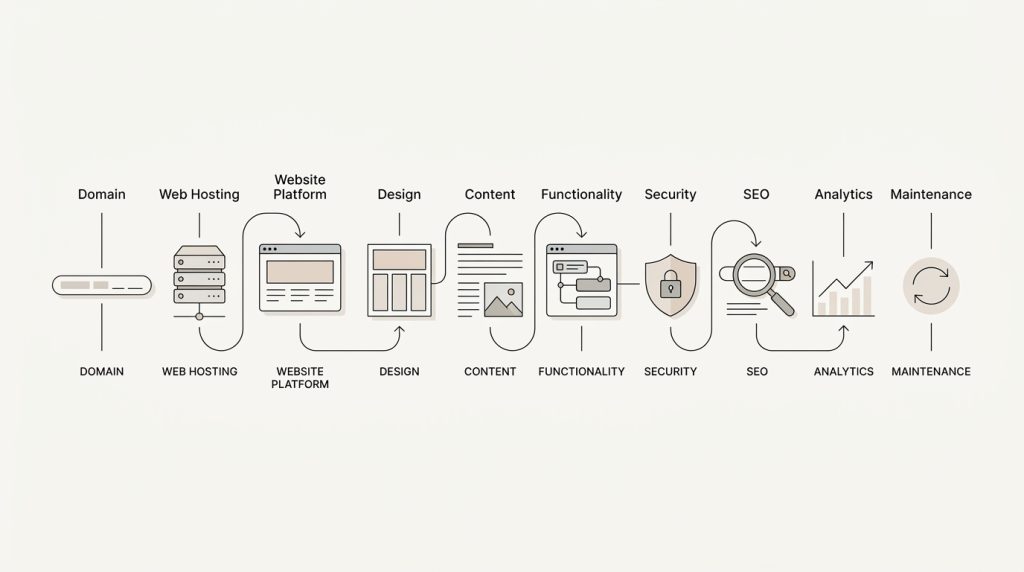
What Is a Domain Name and How Does It Work?
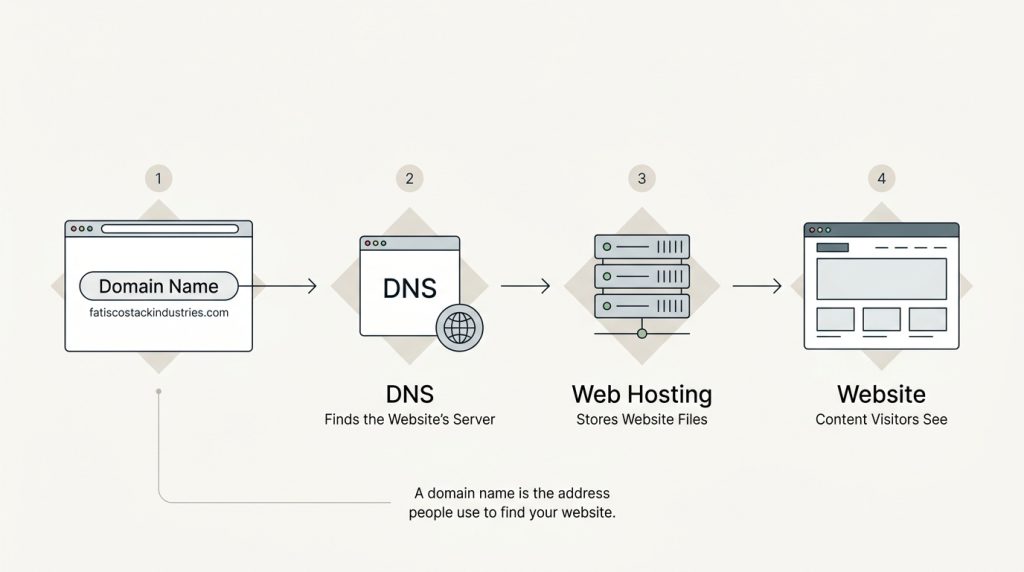
A domain name is the unique web address people use to visit a website, such as fatiscostackindustries.com. It provides a human-readable alternative to the numerical IP address used by computers to locate a website’s server. When someone enters a domain name into a browser, the Domain Name System (DNS) helps connect that name to the correct server.
If you are planning to build a website, one of the first terms you will encounter is domain name.
You may hear people talk about buying a domain, registering a domain, choosing a domain extension, or connecting a domain to a website. These terms can sound technical at first, but the basic idea is relatively simple.
A domain name is the address people use to find your website on the internet.
For example, the domain name for FATISCO STACK INDUSTRIES is:
fatiscostackindustries.com
Just as a physical business needs an address that helps people find its location, a website needs a digital address that allows visitors to find it online.
What Is an Example of a Domain Name?
A domain name can be made up of several parts.
Take this example:
The www is a subdomain commonly used for websites, although it is not required.
The example is the domain name chosen by the website owner.
The .com is the top-level domain, commonly called a TLD.
Other domain extensions include:
.org.net.co.io.shop.store.tech- Country-specific extensions such as
.ng,.uk, and.au
The extension you choose can depend on your brand, location, industry, and availability.
How Does a Domain Name Work?
When you type a domain name into your browser, your computer does not directly understand the domain in the same way a person does.
Behind the scenes, the Domain Name System, or DNS, helps translate the domain name into the IP address associated with the server hosting the website.
You can think of DNS as a kind of internet directory.
You remember a website by its domain name because it is easier for humans to recognize and remember. The underlying systems use IP addresses to locate the appropriate server.
The process happens quickly, usually without you noticing it.
In simple terms:
You enter a domain name → DNS finds the corresponding server → the server sends the website files → your browser displays the website.
This is one reason domain names are so important. They provide a simple and memorable way for people to access websites without needing to remember complicated numerical addresses.
What Is the Difference Between a Domain Name and a Website?
A domain name and a website are not the same thing.
A domain name is the address used to access a website.
A website is the actual collection of pages, content, images, code, and functionality that visitors interact with.
An easy way to understand the difference is to think about a physical business.
The domain name is similar to the business address.
The website is similar to the actual business located at that address.
The address helps people find the business, but the address itself is not the business.
The same principle applies online.
What Is the Difference Between a Domain Name and Web Hosting?
A domain name tells people where to find your website, while web hosting provides the server infrastructure where the website’s files are stored and delivered.
Think of it this way:
Domain name = the address
Web hosting = the place where the website lives
Website = the content and experience visitors interact with
All three work together, but they serve different purposes.
You can register a domain without having a website ready. You can also have hosting without immediately publishing a finished website. However, to make a website accessible through your chosen domain, the domain and hosting need to be properly connected.
How Do You Choose a Good Domain Name?
A good domain name should ideally be easy to remember, easy to spell, and closely connected to your brand or purpose.
When choosing a domain, consider the following:
- Keep it simple. Avoid unnecessarily complicated words or long combinations of characters.
- Make it memorable. A visitor should be able to remember the name after seeing it once or twice.
- Make it easy to spell. If people frequently misspell your domain, they may struggle to find your website.
- Consider your brand. Your domain should make sense alongside your business name and identity.
- Avoid unnecessary numbers and hyphens. These can sometimes make a domain harder to communicate verbally.
- Think about the future. Avoid choosing a domain that limits your business if you plan to expand into new products, services, or markets.
- Check availability. The domain you want may already be registered by someone else.
There is no single formula for choosing the perfect domain. The best choice is one that is relevant, memorable, available, and appropriate for your long-term plans.
Do You Own a Domain Name Forever?
No. A domain name is generally registered for a specific period and must be renewed to remain active.
When you register a domain, you are essentially obtaining the right to use that domain for the registration period. You need to keep the registration active if you want to continue using it.
This is why domain renewal is important.
If a domain expires and is not renewed within the applicable renewal or grace periods, it may eventually become available for someone else to register. Losing a domain can be particularly problematic if it is already associated with an established business, email addresses, marketing materials, and search visibility.
For this reason, businesses should keep their domain registration information up to date and consider enabling automatic renewal where appropriate.
Does Your Domain Name Affect SEO?
A domain name can contribute to your overall online identity, but choosing a domain name alone will not make a website rank highly in search results.
Search visibility depends on many factors, including the quality and relevance of your content, technical SEO, website performance, links, user experience, and the overall authority and trustworthiness of your website.
A short, memorable domain can still be valuable because it can strengthen your brand and make it easier for people to remember and return to your website.
The priority should therefore be choosing a domain that represents your business well rather than trying to force keywords into the domain solely for SEO purposes.
Should You Buy Your Domain and Hosting From the Same Company?
Not necessarily.
You can register your domain with one provider and host your website with another. You can also purchase both from the same company if that is more convenient.
For beginners, using one provider for both services can sometimes simplify setup and management. However, separating them can also give you more flexibility when changing hosting providers or managing your infrastructure.
The most important thing is to understand who controls your domain registration and make sure you retain access to your domain account.
Why Is Your Domain Important for Your Business?
For a business, a domain name is more than just a technical address.
It can become part of your brand identity and appear across your marketing materials, email addresses, social profiles, advertisements, business cards, and customer communications.
For example, an email address using your own domain, such as hello@yourbusiness.com, can present a more professional image than a generic personal email address.
A strong domain can therefore become a long-term digital asset for your business.
This is why it is worth taking time to choose carefully before registering one.
What Is Web Hosting and How Does It Work?
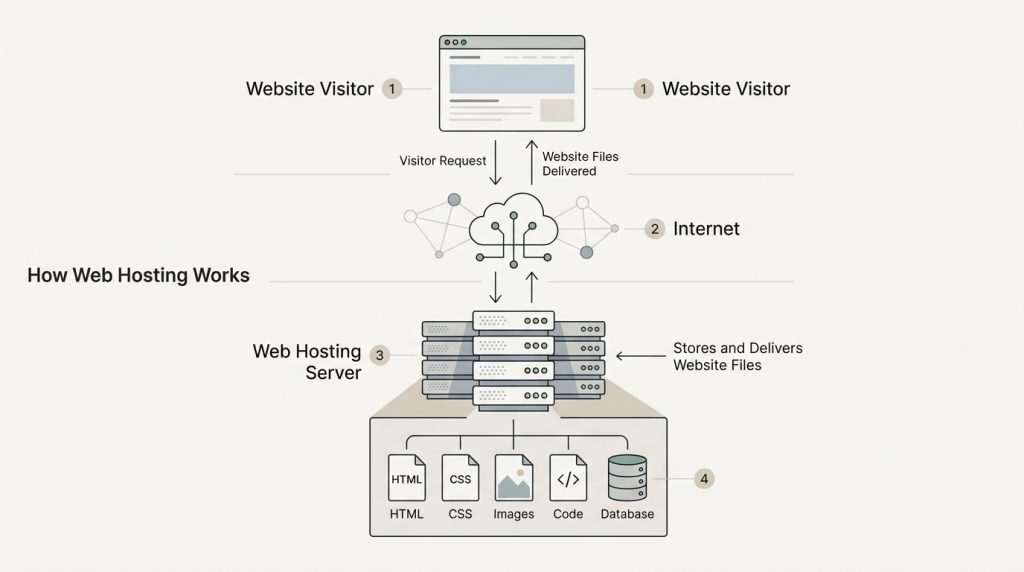
Web hosting is a service that provides the server space and infrastructure needed to store and deliver a website’s files to visitors. When someone enters a website’s domain name into a browser, the hosting server sends the required files, such as HTML, CSS, images, and other resources, so the website can load on the visitor’s device.
Building a website involves more than creating pages and choosing a domain name. Your website also needs somewhere to live.
That is where web hosting comes in.
Every website consists of files and resources that need to be stored on a server. When someone visits your website, their browser requests those resources from the server, and the server delivers them so the page can be displayed.
In simple terms, web hosting provides the infrastructure that makes your website available to people on the internet.
How Does Web Hosting Work?
When you create a website, its files need to be stored somewhere that can be accessed through the internet.
A web hosting provider operates servers designed to store these files and respond to requests from website visitors.
The basic process looks like this:
Visitor enters your domain name → DNS finds the correct server → Hosting server receives the request → Website files are delivered → Browser displays the website.
The process happens within seconds, allowing visitors to access your website from different locations and devices.
The hosting environment may contain many different components, including storage, processing resources, databases, security systems, and network infrastructure.
The amount of resources available to your website can depend on the type of hosting plan you choose.
What Is the Difference Between Web Hosting and a Domain Name?
Web hosting and domain names work together, but they are different things.
A domain name is the address people use to find your website.
Web hosting is the service that provides the server environment where your website’s files and resources are stored and delivered.
For example, imagine opening a physical business.
Your domain name is like the street address that tells people where to find you.
Your web hosting is like the physical building where your business operates.
Your website is everything inside that building that customers interact with.
You generally need both a domain and hosting to operate a traditional self-hosted website, although some website platforms combine these services into a single package.
What Are the Main Types of Web Hosting?
The main types of web hosting include shared hosting, virtual private server hosting, dedicated hosting, and cloud hosting.
Each option provides a different balance of cost, performance, flexibility, and technical control.
Shared Hosting
Shared hosting places multiple websites on the same physical server and its resources.
It is often one of the most affordable options and can be suitable for smaller websites, personal websites, portfolios, and businesses that are just starting online.
The main limitation is that your website shares server resources with other websites. If the server becomes heavily loaded, performance may be affected depending on how the hosting provider manages its resources.
VPS Hosting
VPS stands for Virtual Private Server.
With VPS hosting, a physical server is divided into separate virtual environments. Your website receives a more isolated environment and generally more control than it would with basic shared hosting.
VPS hosting can be useful for growing websites that need more resources or configuration flexibility but do not yet require an entire physical server.
Dedicated Hosting
Dedicated hosting provides an entire physical server for a single customer or organization.
This gives you greater control over the server environment and its resources.
Dedicated hosting can be appropriate for websites or applications with demanding workloads, high traffic levels, or specific technical requirements.
However, it is generally more expensive and often requires greater technical knowledge to manage effectively.
Cloud Hosting
Cloud hosting distributes website resources across a network of connected servers rather than relying entirely on one physical machine.
Depending on the provider and architecture, this can provide flexibility and scalability when website traffic or resource requirements change.
Cloud hosting is widely used for modern websites and applications, but the exact features and pricing models vary considerably between providers.
Which Type of Web Hosting Is Best for a New Website?
For a new website, the best hosting option depends on the website’s purpose, expected traffic, technical requirements, budget, and how much control you need.
A small business website may not need the same hosting infrastructure as a high-traffic online store or a web application.
The goal should not be to choose the most expensive hosting plan available.
Instead, choose an environment that provides enough performance, security, reliability, and room for growth without paying for resources you do not currently need.
As your website grows, you can upgrade your hosting environment when necessary.
What Should You Look for in a Web Hosting Provider?
When comparing hosting providers, consider more than the advertised price.
Look at factors such as:
- Performance: How quickly can the server deliver your website’s content?
- Reliability: Does the provider have a strong record of uptime?
- Security: What security measures are included?
- Backups: Are automatic backups available, and how easily can your website be restored?
- Customer support: Can you get help when something goes wrong?
- Scalability: Can your hosting plan grow with your website?
- Storage and resources: Are the available resources appropriate for your website?
- Server locations: Does the provider have infrastructure suitable for your target audience?
- SSL support: Can you easily use HTTPS to secure connections?
- Control and management: Is the hosting environment easy for you or your developer to manage?
A cheap hosting plan may appear attractive initially, but poor performance, limited support, or weak security can create problems later.
Does Web Hosting Affect Website Speed and SEO?
Yes, web hosting can influence website performance, although it is only one part of the overall picture.
The quality of your hosting infrastructure can affect server response times, uptime, resource availability, and the ability of your website to handle traffic.
However, hosting alone does not determine how fast a website is.
Website code, image sizes, caching, content delivery networks, third-party scripts, plugins, themes, and other technical factors can also affect performance.
From an SEO perspective, a website should provide a good experience for visitors and meet Google’s technical requirements. Strong hosting can support this goal, but simply purchasing expensive hosting does not automatically improve search rankings.
The better approach is to treat hosting as one component of a broader technical foundation.
Do You Need Web Hosting for Every Website?
Not always.
Some website builders and hosted platforms provide hosting as part of their service. In these cases, you may not need to purchase and manage traditional web hosting separately.
For example, a platform may provide the hosting infrastructure, security, updates, and technical environment while you focus on managing your website content and business.
With a self-hosted WordPress website, however, you typically need to arrange hosting separately.
The right choice depends on how much technical control you want and how you plan to build and manage your website.
How Much Does Web Hosting Cost?
Web hosting prices vary significantly depending on the provider, hosting type, resources, contract length, and additional services included.
Basic hosting can be relatively inexpensive, while VPS, dedicated, and specialized cloud infrastructure can cost considerably more.
When comparing prices, look beyond the introductory rate.
Check the regular renewal price, included resources, backup policies, security features, support, and any additional charges.
The cheapest option is not always the best value, especially if your website is important to your business.
The most useful question is not simply, “How much does hosting cost?”
It is:
“What level of hosting does my website actually need?”
That question helps you choose an appropriate solution without unnecessarily overpaying or choosing an environment that cannot support your website as it grows.
What Are the Main Parts of a Website?
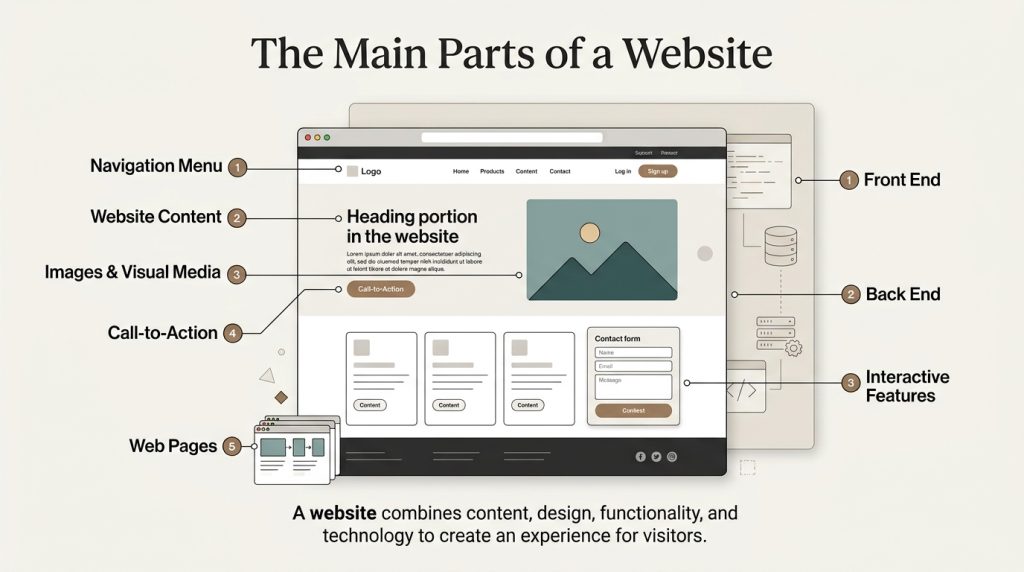
A website is made up of several connected parts that work together to create the experience visitors see and interact with. These include web pages, written content, images, navigation, design elements, code, databases, and interactive features. The exact components depend on the type of website and what it is designed to help visitors accomplish.
What Are the Main Parts of a Website?
When you visit a website, you may see a logo, navigation menu, images, text, buttons, forms, and other interactive elements.
All of these components work together to create the website experience.
Some parts are visible to visitors, while others operate behind the scenes. You do not necessarily need to understand how everything is programmed to use a website, but knowing the basic components can help you understand how websites are created and maintained.
Let’s look at the main parts.
1. Web Pages
A web page is an individual document or section of content that can be accessed through a web browser.
For example, a business website might have separate pages for:
- Home
- About
- Services
- Products
- Blog
- Contact
Each page usually has a specific purpose.
The Home page introduces the business and helps visitors understand what the website is about.
The About page provides information about the business, organization, or people behind it.
A Services page explains what the business offers.
A Contact page gives visitors a way to get in touch.
A Blog can provide educational and informative content that helps visitors while also improving the website’s visibility in search engines.
Together, these individual pages form part of the larger website.
2. Website Content
Content is the information a website provides to its visitors.
This can include:
- Written text
- Product descriptions
- Blog articles
- Images
- Videos
- Infographics
- Case studies
- Testimonials
- Frequently asked questions
- Guides and tutorials
Content is one of the most important parts of a website because it communicates what the business does and helps visitors decide what to do next.
A website can have excellent technical infrastructure, but if its content is unclear, outdated, or unhelpful, visitors may struggle to understand its value.
Good website content should be useful, relevant, easy to understand, and appropriate for the people the website is intended to serve.
3. Navigation
Website navigation helps visitors move from one page or section to another.
The most common example is a navigation menu, which may contain links such as:
Home | About | Services | Blog | Contact
Navigation can also include:
- Dropdown menus
- Breadcrumbs
- Internal links
- Buttons
- Footer links
- Search functions
Good navigation makes it easier for visitors to find what they are looking for.
Poor navigation can have the opposite effect. If someone has to search extensively to find basic information, they may leave the website before taking any meaningful action.
This is why website structure and navigation should be planned around the needs of the visitor rather than simply around the preferences of the website owner.
4. Website Design and Layout
Website design determines how the website looks and how information is presented.
This includes elements such as:
- Colors
- Typography
- Spacing
- Images
- Icons
- Buttons
- Page layouts
- Visual hierarchy
Design is not simply about making a website look attractive.
A good design should also help visitors understand the information on the page and move through the website easily.
For example, an important call-to-action button should be easy to identify. Headings should make the content easy to scan. Related information should be grouped together.
Good design supports usability.
5. HTML, CSS, and JavaScript
Behind the visible parts of many websites are technologies that help create and control what visitors see and interact with.
Three common technologies are HTML, CSS, and JavaScript.
HTML (HyperText Markup Language) provides the basic structure of a web page. It helps define elements such as headings, paragraphs, links, images, and forms.
CSS (Cascading Style Sheets) controls how those elements look. It can determine colors, fonts, spacing, layouts, and how a website adapts to different screen sizes.
JavaScript adds interactive behavior and functionality. It can be used for things such as interactive menus, form validation, dynamic content, calculators, and many other features.
You do not need to become a programmer to understand these technologies at a basic level. However, they help explain why a website can have both a visual interface and interactive functionality.
6. Images and Visual Media
Images play an important role on many websites.
A business might use photographs to showcase its products, illustrations to explain an idea, or graphics to communicate information quickly.
Visual media can help:
- Explain complex concepts
- Showcase products
- Establish brand identity
- Break up large blocks of text
- Improve the overall user experience
However, images should be used thoughtfully.
Large, poorly optimized images can slow down a website. Images should also have meaningful alternative text when appropriate so that their purpose can be understood by users who rely on assistive technologies and by search engines when the image content is relevant.
The best visual content is not simply decorative. It should contribute something useful to the visitor’s experience.
7. Forms and Interactive Features
Many websites allow visitors to do more than simply read information.
They may allow users to:
- Send a message
- Request a quote
- Subscribe to an email list
- Create an account
- Search for information
- Book an appointment
- Add products to a shopping cart
- Complete a purchase
- Upload information
These functions are usually powered by interactive features that connect the website’s front end with systems operating behind the scenes.
For a business website, these features can be important because they allow visitors to take meaningful actions instead of simply viewing pages.
8. Databases and Dynamic Content
Some websites display mostly fixed information, while others need to retrieve and update information dynamically.
For example, an online store may have thousands of products stored in a database.
When a visitor searches for a product, the website can retrieve the relevant information and display it on the page.
A database may store information such as:
- Product details
- Customer accounts
- Orders
- Blog posts
- Inventory
- User information
This is one reason modern websites can provide personalized and interactive experiences.
Not every website needs a complex database, but many business platforms, online stores, membership websites, and web applications rely heavily on databases.
9. The Front End and the Back End
One simple way to understand how websites work is to divide them into two broad areas: the front end and the back end.
The front end is the part of the website visitors interact with directly.
This includes the pages, menus, buttons, images, forms, and other elements displayed in the browser.
The back end is the part that operates behind the scenes.
It can handle things such as:
- Data processing
- User accounts
- Databases
- Authentication
- Business logic
- Server-side operations
For example, when you log into an online store, you interact with the front end. Behind the scenes, the back end may verify your login details, retrieve your account information, and securely process the request.
The two sides work together to create the complete website experience.
How Do All These Parts Work Together?
A website is not just one thing.
It is a collection of connected components that work together toward a common purpose.
A visitor might arrive at a website through a search engine, social media, an advertisement, or a direct link.
They see the website’s design and content through the front end. They use the navigation to find different pages. They may fill out a form or purchase a product. Behind the scenes, the website’s code, server, database, and other systems process the necessary information.
In simple terms:
The content communicates the message.
The design presents the message.
The navigation helps people find the message.
The front end creates the visible experience.
The back end handles processes behind the scenes.
The server and hosting infrastructure deliver the website to visitors.
All of these pieces contribute to the website as a whole.
The complexity of these components will depend on what the website is designed to do. A simple personal website may have relatively few moving parts, while an online marketplace or web application may involve complex databases, payment systems, authentication, APIs, and custom software.
This is also why websites can be built in very different ways.
And that leads to the next question.
How Are Websites Built?
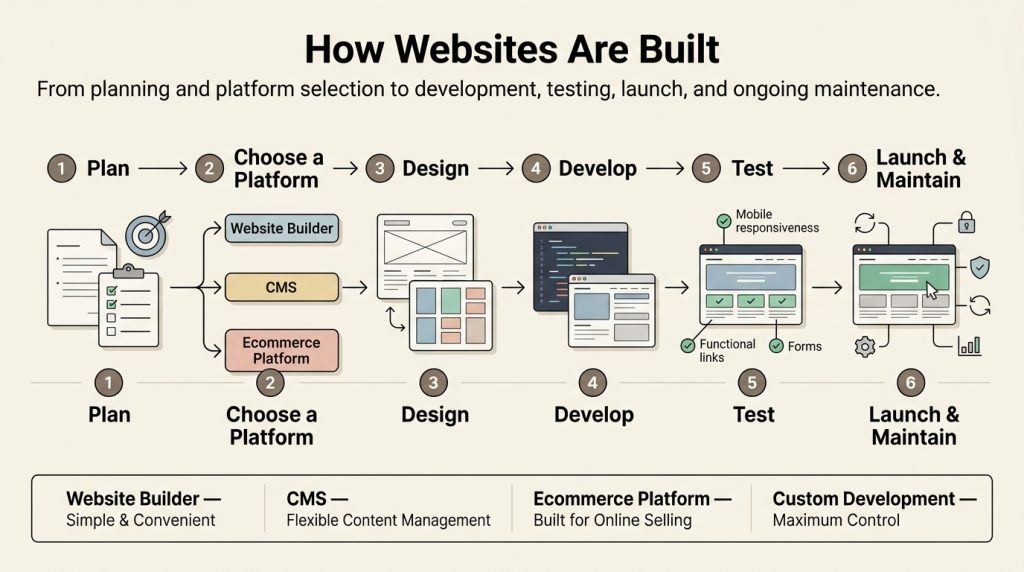
There is no single way to build a website.
The best approach depends on what the website needs to do, how much customization is required, the available budget, and the technical skills of the people building it.
A simple business website may be created using a website builder or content management system. A large online store may use a specialized ecommerce platform. A more complex web application may require developers to build custom software from the ground up.
At a basic level, there are three common approaches to building a website.
1. Website Builders
Website builders allow people to create websites using visual tools rather than writing all the code themselves.
Most website builders provide templates, drag-and-drop editors, hosting, and other features that simplify the process.
This can make them a practical option for beginners, small businesses, portfolios, and simple websites.
The main advantage is convenience. You can often create and publish a website without having extensive technical knowledge.
However, website builders may have limitations when you need highly customized functionality or want complete control over how the website works.
2. Content Management Systems
A content management system, commonly called a CMS, is software that allows users to create, organize, edit, and publish website content.
One of the best-known examples is WordPress.
A CMS can make it easier to manage pages, blog posts, images, categories, users, and other types of content without manually editing every part of the website’s code.
Many CMS platforms also support plugins, themes, extensions, or other add-ons that can expand what a website can do.
For example, a business might use a CMS for its main website and add features for contact forms, SEO, analytics, ecommerce, or membership functionality.
The advantage of a CMS is that it provides a balance between ease of use and flexibility. However, the website owner may still need to manage updates, security, hosting, performance, and other technical considerations depending on the platform.
3. Ecommerce Platforms
If the primary purpose of a website is to sell products or services online, an ecommerce platform may be a better choice.
Ecommerce platforms are designed around online selling and often include features such as:
- Product management
- Shopping carts
- Checkout systems
- Payment processing
- Order management
- Inventory management
- Customer accounts
This means a business does not have to build every ecommerce function from scratch.
The platform provides much of the infrastructure needed to operate an online store, while the business can focus on its products, customers, branding, and marketing.
However, ecommerce websites can become more complex as a business grows. A store may eventually require additional integrations, custom functionality, better performance, or more advanced automation.
4. Custom Website Development
Some websites need functionality that cannot easily be provided by a standard website builder or platform.
In these cases, developers may build a website using custom code.
Custom development can provide greater control over the website’s functionality, architecture, design, and integrations.
A custom website might be appropriate for:
- Complex web applications
- Unique business systems
- Specialized customer portals
- Large-scale platforms
- Advanced data processing
- Custom integrations
The trade-off is that custom development usually requires more time, technical expertise, and ongoing maintenance.
It is also important to understand that “custom” does not automatically mean “better.”
A custom-built website can be unnecessarily expensive if the business only needs a simple website that could have been created efficiently using an existing platform.
The right solution is the one that matches the actual needs of the business.
5. How Do Developers Build a Website?
When developers build a website, they typically work with several technologies and systems.
The front end may be created using technologies such as HTML, CSS, and JavaScript, along with various frameworks and libraries.
The back end may use programming languages and frameworks to handle business logic, user accounts, databases, authentication, and other processes.
The website may also connect to external services through APIs.
For example, an online store might connect to:
- A payment provider
- An email marketing platform
- A shipping service
- An accounting system
- A customer relationship management platform
These connections allow different systems to communicate with one another.
From the visitor’s perspective, the experience may appear simple. Behind the scenes, however, several technologies can work together to deliver a single page or complete transaction.
6. Which Method Is Best for Building a Website?
There is no universal answer.
A small business that needs a professional online presence may be well served by a website builder or CMS.
An online retailer may benefit from an ecommerce platform.
A business with unique technical requirements may need custom development.
The important thing is to start with the website’s purpose and requirements rather than choosing a technology simply because it is popular.
Ask questions such as:
- What does the website need to accomplish?
- Who will use it?
- How much content will it contain?
- Does it need ecommerce functionality?
- Will customers need accounts?
- Does it require third-party integrations?
- Who will maintain the website?
- How much flexibility will the business need as it grows?
The answers to these questions can help determine which approach makes the most sense.
A website should be built around the needs of its users and the goals of the business. The technology should support those goals rather than become the goal itself.
Can You Build a Website Without Knowing How to Code?
Yes.
You do not necessarily need to know how to write code to create a website.
Website builders and content management systems have made it possible for many people to create and manage websites without being professional developers.
However, not knowing how to code does not mean that technical knowledge has no value.
Understanding basic concepts such as domains, hosting, website structure, security, SEO, and performance can help you make better decisions about your website.
For more complex projects, working with a professional developer or specialist may also be the more practical option.
The goal is not always to build everything yourself. Sometimes the better decision is to understand what you need and work with the right tools or professionals to achieve it.
What Happens After a Website Is Built?
Building the website is only part of the process.
Once a website is created, it needs to be tested and prepared for real visitors.
This can include checking whether:
- Pages work correctly
- Links lead to the right destinations
- Forms submit successfully
- The website works on mobile devices
- Images load properly
- Pages load quickly
- Security measures are in place
- Search engines can discover important pages
After launch, the website may also need regular updates, content improvements, security monitoring, backups, performance optimization, and technical maintenance.
A website is therefore not always a one-time project.
For many businesses, it is an ongoing digital asset that needs to evolve as the business, its customers, and its goals change.
What Do You Need to Create a Website?
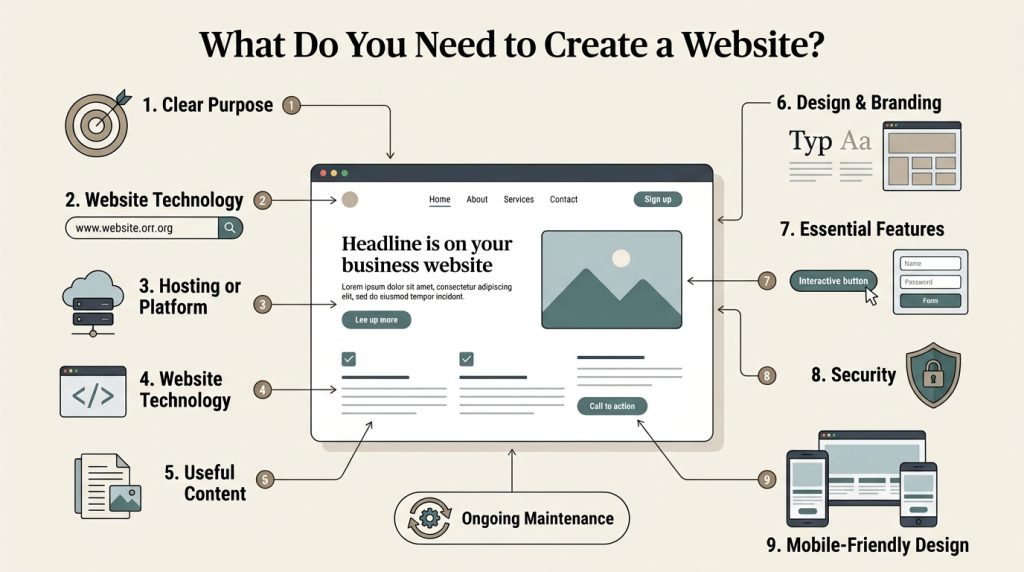
Creating a website can be as simple or as complex as you need it to be.
A basic personal website may require only a domain name, a website platform, some content, and a way to publish it online. A larger business website or online store may require additional systems, integrations, professional design, security features, and ongoing technical support.
Although the exact requirements vary, most websites need several basic components to get started.
1. A Clear Purpose
Before choosing a platform or purchasing anything, you need to know why the website exists.
A website might be created to:
- Introduce a business
- Generate leads
- Sell products
- Offer services
- Publish information
- Build a personal brand
- Share educational content
- Provide access to an online application
Having a clear purpose helps guide almost every other decision.
For example, a website designed to sell physical products will need different features from a simple portfolio website.
Starting with the purpose also helps prevent businesses from spending money on unnecessary features.
2. A Domain Name
Your website needs an address that people can use to find it online.
This is your domain name.
For example:
yourbusiness.com
A good domain name should ideally be easy to remember, easy to type, and relevant to the business or purpose of the website.
You generally need to register a domain through a domain registrar, although some website platforms also allow you to purchase a domain directly through them.
Your domain is the public address of your website, but it does not contain the website itself. You still need a way to host or publish the website.
3. Web Hosting or a Website Platform
Your website also needs somewhere to operate and deliver its files and content to visitors.
For websites using traditional hosting, this means choosing a web hosting provider.
However, not every website requires separate hosting purchased independently.
Some platforms combine hosting and website management into one service. This can simplify the process because the platform manages much of the technical infrastructure for you.
The right option depends on how the website is being built and what it needs to accomplish.
4. A Website Platform or Technology
You need a system that allows the website to be created and managed.
This could be:
- A website builder
- A content management system
- An ecommerce platform
- A custom-developed application
The choice depends on the website’s requirements.
A small business may choose a CMS or website builder, while an online retailer may use an ecommerce platform. A company with specialized requirements may need a custom-developed solution.
The important thing is to choose a technology that is appropriate for the website rather than simply choosing the most popular option.
5. Website Content
A website needs something useful to communicate.
This may include:
- Business information
- Service descriptions
- Product information
- Blog articles
- Images
- Videos
- Case studies
- Testimonials
- Contact information
The content should be created with the intended audience in mind.
A visitor should be able to quickly understand what the website is about, what the business offers, and what they can do next.
Content also plays an important role in search visibility. Search engines and AI-powered discovery systems rely on clear, relevant, and useful information to understand what a website is about.
This is why content should not be treated as something to add at the very end of the website project.
6. A Website Design
Your website also needs a visual structure that makes the content easy to understand and navigate.
This includes decisions about:
- Layout
- Typography
- Colors
- Images
- Spacing
- Navigation
- Buttons
- Branding
The design should reflect the purpose and audience of the website.
For example, a professional services company may need a different visual approach from a fashion store, technology startup, or personal portfolio.
Good design should balance appearance with usability.
The website should look appropriate for the brand while making it easy for visitors to find information and complete important actions.
7. Essential Website Features
Depending on the purpose of the website, you may need additional functionality.
Examples include:
- Contact forms
- Search functionality
- Booking systems
- Customer accounts
- Shopping carts
- Payment processing
- Product filters
- Email subscriptions
- Live chat
- Membership systems
Not every website needs all of these features.
The best approach is to identify what visitors actually need and add functionality that supports those needs.
Adding too many unnecessary features can make a website more complicated, expensive, and difficult to maintain.
8. Security
Website security should be considered from the beginning.
A website may need security measures such as:
- HTTPS and SSL/TLS encryption
- Strong administrator passwords
- Secure user authentication
- Software updates
- Regular backups
- Security monitoring
The exact requirements depend on the website.
For example, an online store handling customer accounts and payments will generally have more security considerations than a simple informational website.
Security is not something that should only be considered after a problem occurs. It should be part of the website’s overall setup and maintenance process.
9. Mobile-Friendly Design
A website should work well across different screen sizes.
Visitors may access it using:
- Desktop computers
- Laptops
- Tablets
- Smartphones
A mobile-friendly website adapts its layout and content so that visitors can use it comfortably on smaller screens.
This includes making sure that text is readable, buttons are easy to tap, navigation works properly, and important content is not difficult to access.
Mobile responsiveness is now a basic expectation for most modern websites.
10. A Plan for Maintenance
Launching a website does not necessarily mean the work is finished.
Websites may require ongoing:
- Content updates
- Software updates
- Security checks
- Backups
- Performance monitoring
- Broken-link checks
- Technical improvements
A business website may also need new pages, articles, products, or features as the business grows.
Before launching a website, it is worth considering who will be responsible for maintaining it.
This could be the business owner, an internal team, a developer, or an external specialist.
A website that is regularly maintained is generally easier to keep secure, accurate, useful, and effective over time.
Do You Need All of These Things Before Building a Website?
Not necessarily.
You do not need to have everything perfectly prepared before you begin.
A simple website might start with a domain, a suitable platform, basic branding, and a small amount of well-written content. More advanced features can be added as the website grows.
What matters most is having a clear purpose and choosing the right foundation.
It is often better to launch a simple, useful website and improve it over time than to spend months trying to create a perfect website that never goes live.
The requirements will also change depending on the type of website you are creating.
A personal blog, business website, online store, membership platform, and web application may all require different technologies and resources.
The key is to build according to actual needs rather than adding complexity simply because it is available.
What Makes a Good Website?
A good website is more than a collection of attractive pages.
It should help visitors quickly understand what the website is about, find the information they need, and complete whatever action they came to take.
For a business, that might mean contacting the company, requesting a quote, booking a service, or purchasing a product.
A good website combines useful content, thoughtful design, reliable technology, and a clear understanding of its audience.
Here are some of the qualities that make a website effective.
1. It Has a Clear Purpose
A visitor should not have to spend several minutes trying to figure out what a website is about.
The homepage should communicate the website’s purpose clearly and quickly.
A business website, for example, should make it reasonably obvious:
- What the business does
- Who it serves
- What products or services it provides
- Why visitors should care
- What visitors can do next
A clear purpose creates a better starting point for the entire website.
2. It Is Easy to Navigate
Visitors should be able to move around the website without getting confused.
Important pages should be easy to find, and the navigation should follow a logical structure.
A visitor should not have to search through multiple unrelated pages just to find basic information such as contact details or service descriptions.
Simple navigation is often better than an overly complicated menu with too many options.
3. It Works Well on Mobile Devices
A modern website should provide a good experience across different screen sizes.
This is particularly important because many people access websites using smartphones.
A mobile-friendly website should have:
- Readable text
- Properly sized buttons
- Easy-to-use navigation
- Images that fit the screen
- Forms that are comfortable to complete
- Content that does not require excessive horizontal scrolling
A website that works well on a desktop computer but is difficult to use on a smartphone can create a poor experience for a significant portion of its visitors.
4. It Loads Quickly
Website speed affects the user experience.
When pages take too long to load, visitors may become frustrated and leave before the content appears.
Website performance can be affected by factors such as:
- Large images
- Poorly optimized code
- Excessive plugins or scripts
- Slow hosting
- Unnecessary third-party services
- Poorly configured caching
Improving performance is therefore not just about making a website technically faster. It is also about removing unnecessary elements and making sure visitors can access important information efficiently.
5. It Provides Useful Content
A website should provide information that is genuinely useful to its intended audience.
For a business, this might include clear service descriptions, product information, pricing guidance, helpful articles, case studies, or answers to common questions.
Useful content helps visitors understand the business and make informed decisions.
It can also help search engines and AI-powered discovery systems better understand the topics and services associated with the website.
The goal should not simply be to fill pages with words. The goal should be to provide information that answers real questions and meets real needs.
6. It Builds Trust
Visitors need reasons to feel comfortable interacting with a website.
Trust can be supported by elements such as:
- Clear contact information
- Professional branding
- Accurate business information
- Customer reviews
- Testimonials
- Case studies
- Secure connections
- Clear policies
- Transparent pricing where appropriate
For an online store, trust can be especially important because customers may need to provide personal and payment information before completing a purchase.
A professional website should make visitors feel confident about who is behind it and what will happen if they choose to take the next step.
7. It Is Accessible
A good website should be usable by as many people as reasonably possible, including people who use assistive technologies.
Accessibility can involve considerations such as:
- Meaningful alternative text for relevant images
- Sufficient color contrast
- Clear heading structures
- Keyboard-friendly navigation
- Readable text
- Properly labelled form fields
Accessibility is not simply a technical requirement. It is part of creating a website that respects the different ways people access and interact with digital information.
8. It Has a Clear Call to Action
A website should make it clear what visitors can do next.
Depending on the website’s purpose, this might be:
- Contact us
- Request a quote
- Book an appointment
- Shop now
- Learn more
- Subscribe
- Download a guide
A call to action gives visitors a clear path forward.
Without one, a visitor may understand what a business does but still be unsure about what action to take.
The call to action should be relevant to the visitor’s stage in their journey rather than appearing repeatedly without context.
9. It Is Easy to Find Through Search
A good website should be discoverable by the people who are looking for what it offers.
This is where search engine optimization, or SEO, becomes important.
SEO involves improving aspects of a website so that search engines can better understand its content and users can discover relevant pages through search.
However, SEO should not be treated as a collection of tricks designed only to manipulate rankings.
A strong foundation begins with:
- Useful content
- Clear website structure
- Descriptive page titles
- Good headings
- Relevant internal links
- Fast performance
- Mobile usability
- Accessible content
The same principle increasingly applies to answer engines and generative AI systems. Clear, well-structured, trustworthy information is easier for different discovery systems to understand and reference.
We will explore SEO, AEO, and GEO in much greater depth in dedicated articles later.
10. It Is Maintained Over Time
A website should not be considered finished forever once it has been published.
Businesses change.
Products change.
Services change.
Technology changes.
Customer expectations change.
A good website needs to evolve with those changes.
Regular maintenance may include updating content, fixing broken links, improving performance, applying security updates, reviewing outdated information, and adding new features when necessary.
A website that was excellent several years ago may no longer provide the same experience today if it has been neglected.
Does a Good Website Need to Look Expensive?
Not necessarily.
A website does not need complex animations, elaborate graphics, or expensive visual effects to be effective.
In many cases, simplicity can be an advantage.
What matters more is whether the website is:
- Clear
- Useful
- Fast
- Easy to navigate
- Trustworthy
- Accessible
- Appropriate for its audience
A simple website that helps visitors accomplish their goals can be more effective than an impressive-looking website that is confusing or difficult to use.
The best website is not necessarily the one with the most features.
It is the one that does its job well.
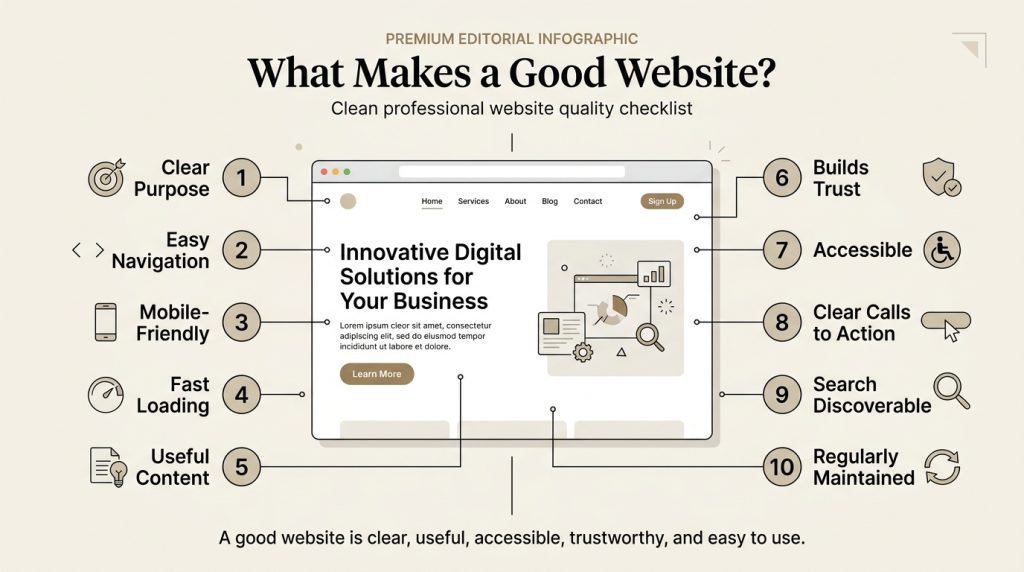
What Should You Do After Creating a Website?
Launching a website is an important milestone, but it is not the end of the process.
Once your website is live, the next step is to make sure it works properly, can be discovered by the right people, and continues to provide a useful experience over time.
The exact steps will depend on the type of website you have created, but there are several important things you should consider after launch.
1. Test the Website
Before actively promoting your website, take time to test it.
Visit the website yourself and check the experience from a visitor’s perspective.
Look at important pages and make sure:
- Links work correctly
- Buttons lead to the right places
- Contact forms submit successfully
- Images display properly
- Navigation works as expected
- Pages work on mobile devices
- Important information is accurate
- There are no obvious spelling or formatting errors
It can also be useful to ask someone who was not involved in building the website to test it.
A fresh pair of eyes may notice problems that the person who created the website has overlooked.
2. Connect Analytics and Search Tools
Once your website is live, you should consider setting up tools that help you understand how people find and use it.
Analytics tools can provide information about visitor behavior, such as which pages receive traffic and how visitors interact with the website.
Search tools can help you understand how search engines discover and index your pages and whether there are technical issues that need attention.
These tools can turn website management from guesswork into a more informed process.
You can then use the information you collect to identify opportunities for improvement.
3. Make Sure Search Engines Can Discover Your Website
Creating a website does not automatically guarantee that it will appear prominently in search results.
Search engines need to be able to discover, crawl, and understand your pages.
This is where technical SEO and content optimization become important.
You should make sure that important pages are accessible to search engines and that your website has a logical structure.
A sitemap can also help search engines discover the pages you want them to know about.
However, submitting a sitemap does not guarantee rankings. Search visibility depends on many factors, including the quality and relevance of your content, technical performance, authority, competition, and the searcher’s intent.
4. Create Useful Content
A website should not remain static if your audience’s needs are changing.
Consider creating useful content that answers the questions your potential customers are actually asking.
This might include:
- Blog posts
- Guides
- Tutorials
- Frequently asked questions
- Case studies
- Product comparisons
- Industry insights
Useful content can help attract visitors, demonstrate expertise, and give people more reasons to return to your website.
It can also create additional opportunities for your website to appear in traditional search results, answer engines, and AI-powered discovery experiences.
The focus should be on helping people rather than publishing content simply to increase the number of pages on your website.
5. Promote Your Website
A website needs visibility.
You can promote it through channels that are appropriate for your audience and business.
These might include:
- Search engines
- Social media
- Email marketing
- Online communities
- Paid advertising
- Partnerships
- Business directories
- Word-of-mouth referrals
The best promotional strategy depends on where your audience spends time and how they make decisions.
For example, a visual brand may benefit from social media, while a professional service may generate more opportunities through search, referrals, and educational content.
The goal is not to be everywhere.
The goal is to reach the right people in the places where they are most likely to pay attention.
6. Monitor Website Performance
After launch, pay attention to how the website performs.
Monitor things such as:
- Page loading speed
- Mobile usability
- Traffic patterns
- Conversion rates
- Broken links
- Search visibility
- Form submissions
- User behavior
If you notice that visitors frequently leave a particular page without taking action, that may indicate an opportunity to improve the content, design, or user experience.
Website performance should be treated as something that can be measured and improved over time.
7. Keep the Website Secure and Updated
Websites require ongoing maintenance.
Depending on the platform, you may need to update:
- Themes
- Plugins
- Extensions
- Software
- Security systems
You should also maintain regular backups and review user access to make sure only authorized people have administrative permissions.
Security problems can occur when websites are neglected, especially when outdated software or poorly maintained components are involved.
Regular maintenance can reduce unnecessary risks and help keep the website running properly.
8. Keep Your Information Current
A website can lose credibility when its information becomes outdated.
Review important information regularly.
This may include:
- Business hours
- Contact details
- Services
- Product information
- Prices
- Team information
- Policies
- Company announcements
If a visitor finds outdated information on your website, they may question whether the business is still active or reliable.
Keeping your website current shows visitors that the business is paying attention to its online presence.
9. Improve the Website Over Time
Your first version does not have to be your final version.
As you learn more about your visitors and customers, you may discover that certain pages need better explanations, navigation needs improvement, or a particular feature would make the experience easier.
You can use feedback, analytics, customer questions, and business goals to guide future improvements.
This is often a better approach than trying to predict everything before launching.
Build a useful foundation, launch it, learn from real users, and improve where the evidence shows that changes are needed.
10. Think Beyond the Website
Your website is one part of your broader digital presence.
Depending on your goals, you may eventually connect it with:
- Social media
- Email marketing
- Customer relationship management systems
- Ecommerce platforms
- Payment providers
- Analytics tools
- Advertising platforms
- Business listings
These systems can work together to help a business attract visitors, communicate with customers, manage operations, and generate sales.
The website often becomes the central point where these different activities come together.
Is a Website Ever Truly Finished?
Technically, a website can be launched and considered complete.
But in practice, most successful websites continue to evolve.
A business may introduce a new service. A store may add new products. Customers may ask new questions. Technology may change. Search engines may update how they evaluate websites.
All of these changes can create reasons to update or improve the website.
This does not mean you need to redesign your website every few months.
It simply means that a website should be treated as an ongoing business asset rather than a one-time task that is forgotten immediately after launch.
The best approach is to launch with a solid foundation, monitor how the website performs, listen to your audience, and make improvements when they are genuinely needed.
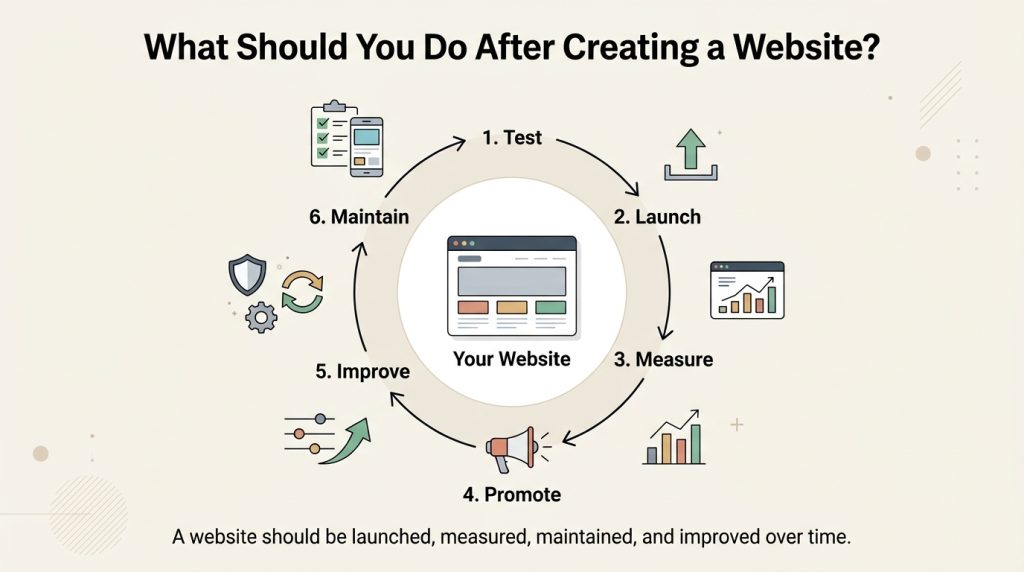
Frequently Asked Questions About Websites
If you are new to websites, you may still have a few questions about how they work, what they cost, and what you need to get started.
Here are answers to some of the most common questions beginners ask.
What is a website in simple terms?
A website is a collection of connected web pages and digital content that people can access through the internet using a web browser.
A website can be used for many different purposes, including sharing information, promoting a business, selling products, publishing content, building a community, or providing online services.
What is the difference between a website and a web page?
A website is the complete collection of related pages and resources available under a particular web address or domain.
A web page is an individual page within that website.
For example, a business website might contain separate pages for Home, About Us, Services, Blog, and Contact.
The website is the whole structure, while each of those pages is one part of it.
Do I need a domain name to create a website?
If you want a website that people can access through your own branded web address, you will generally need a domain name.
For example, a business might register a domain such as example.com and use it as the primary address for its website.
Some website-building platforms also provide temporary or platform-based addresses, but businesses and organizations often choose a custom domain because it is easier to remember and supports a more professional online presence.
Do I need web hosting to have a website?
For most traditional websites, yes.
Web hosting provides the server environment where your website’s files and other resources are stored and delivered to visitors.
However, the situation can be different when using an all-in-one website platform. Some platforms include hosting as part of their service, so you do not need to purchase hosting separately.
How much does it cost to create a website?
There is no single price for creating a website.
The cost depends on factors such as the type of website, the platform you use, the domain name, hosting, design requirements, functionality, content, and whether you build it yourself or hire a professional.
A simple personal website may cost relatively little to set up, while a custom business website, online store, or complex web application can require a much larger investment.
The important thing is to consider what the website needs to accomplish rather than choosing a price based only on the number of pages.
How long does it take to build a website?
The timeline can range from a few hours to several months.
A simple website using an existing template can potentially be launched quickly.
A custom website with unique designs, extensive content, integrations, ecommerce functionality, or complex features will usually take longer.
The amount of preparation also affects the timeline. Having your content, images, branding, and business information ready before development can make the process more efficient.
Can I create a website myself?
Yes.
There are many website builders and content management systems that allow people without advanced programming knowledge to create websites.
You can also create a website using code if you have the necessary technical skills.
The best approach depends on your goals, technical experience, budget, available time, and how much control you want over the final result.
Do I need to know how to code to create a website?
No, not necessarily.
Modern website builders and content management systems allow many people to create and manage websites without writing code.
However, knowing HTML, CSS, JavaScript, or other programming languages can be useful when you need more customization or want to build functionality beyond what a platform provides.
For simple websites, coding knowledge may not be necessary. For complex or highly customized projects, technical expertise can become much more important.
What is the difference between a website and an online store?
An online store is a type of website specifically designed to sell products or services online.
It usually includes ecommerce features such as product pages, shopping carts, checkout systems, payment processing, and order management.
A website can exist without selling anything directly.
For example, a company may have a website that simply explains its services and allows visitors to contact the business.
An online store is therefore a website with additional functionality designed around online transactions.
Can I change my website after it is published?
Yes.
Websites can usually be updated after they are published.
You can change text, images, layouts, products, services, navigation, and other elements depending on the platform or technology being used.
In fact, regular updates are often an important part of maintaining a website.
Does having a website guarantee that people will find my business?
No.
Publishing a website makes it available on the internet, but it does not automatically guarantee traffic or high search rankings.
People need a way to discover it.
This can happen through search engines, social media, referrals, advertising, email marketing, online directories, or other channels.
Search engine optimization can also help relevant pages become more discoverable in search results, but SEO is a long-term process and does not guarantee a specific ranking.
Does every website need a blog?
No.
A blog is not necessary for every website.
However, publishing useful articles can be valuable for businesses that want to answer customer questions, demonstrate expertise, attract organic search traffic, and provide more information about their products or services.
Whether a blog is worthwhile depends on the website’s goals and the audience it serves.
How do I know if my website is working well?
You can evaluate a website using both technical and business measurements.
Depending on your goals, you might monitor:
- Website loading speed
- Mobile usability
- Search visibility
- Website traffic
- Visitor engagement
- Contact form submissions
- Leads
- Sales
- Conversion rates
The most important measurements are usually the ones connected to the purpose of your website.
For example, a business website may care more about generating qualified enquiries than simply receiving a large number of visitors.
Do websites need regular maintenance?
Yes.
Websites often require ongoing maintenance to remain secure, functional, accurate, and useful.
Maintenance may include updating software, checking links, reviewing content, monitoring performance, maintaining backups, improving security, and making changes as the business or audience evolves.
How much maintenance is required depends on the platform and complexity of the website.
What should I do if my website is not getting visitors?
First, determine where the problem is.
Check whether search engines can discover and index your pages. Review your website’s content, technical performance, user experience, and visibility across relevant channels.
You may also need to consider whether you are reaching the right audience.
A website can receive little traffic because it is difficult to find, targets the wrong search intent, provides limited value, or simply has not been promoted effectively.
Improving a website is usually a process of identifying the problem, making informed changes, and measuring the results.
Is SEO enough to make a website successful?
No.
SEO can help people discover a website through search engines, but website success depends on more than visibility.
Once visitors arrive, the website still needs to provide a good experience and help them accomplish their goals.
Depending on the business, success may also depend on factors such as branding, content quality, trust, pricing, customer service, product quality, conversion optimization, and marketing.
SEO is one part of a broader digital strategy.
What Should You Do Next?
Creating a website can seem complicated when you are just getting started, but the process becomes much easier once you understand the basic pieces involved.
You now know that a website is more than just a collection of pages. It brings together a domain name, hosting, content, design, technology, and a clear purpose to create an online experience that people can access from almost anywhere.
If you are planning to create your first website, start by defining what you want it to achieve and who you want to reach. From there, choose the right platform, secure a suitable domain name, organize your content, and build a simple experience that makes it easy for visitors to find what they need.
You do not need to have everything perfect from day one. A good website can grow and improve as your audience, business, and goals develop.
The most important thing is to start with a solid foundation, focus on providing genuine value, and continue improving based on what you learn.
Whether you are creating a personal website, building an online presence for a business, launching an online store, or developing a more advanced web project, understanding the fundamentals will help you make better decisions along the way.
Your website is not simply a place to exist online. When built and managed properly, it can become a valuable part of how you communicate, serve your audience, build trust, and grow.