Selected store outcomes
Real store data. A clearer view of progress.
Explore analytics snapshots shared by store owners we have supported. From sales and returning customers to traffic and checkout behaviour, each view offers a practical look at the signals behind an online business.
Talk through your store goalsHow to read these examples: The screenshots come from different stores and time periods, and were shared with permission. Results reflect each store’s own circumstances; they are not a promise of future performance or proof that any single change caused a particular outcome. Select any image to view it full size, or expand its note for more context.
Sales & order performance
Sales & order performance
Trading snapshots from different stores and reporting windows. Each dashboard should be read within its own date range and comparison period.
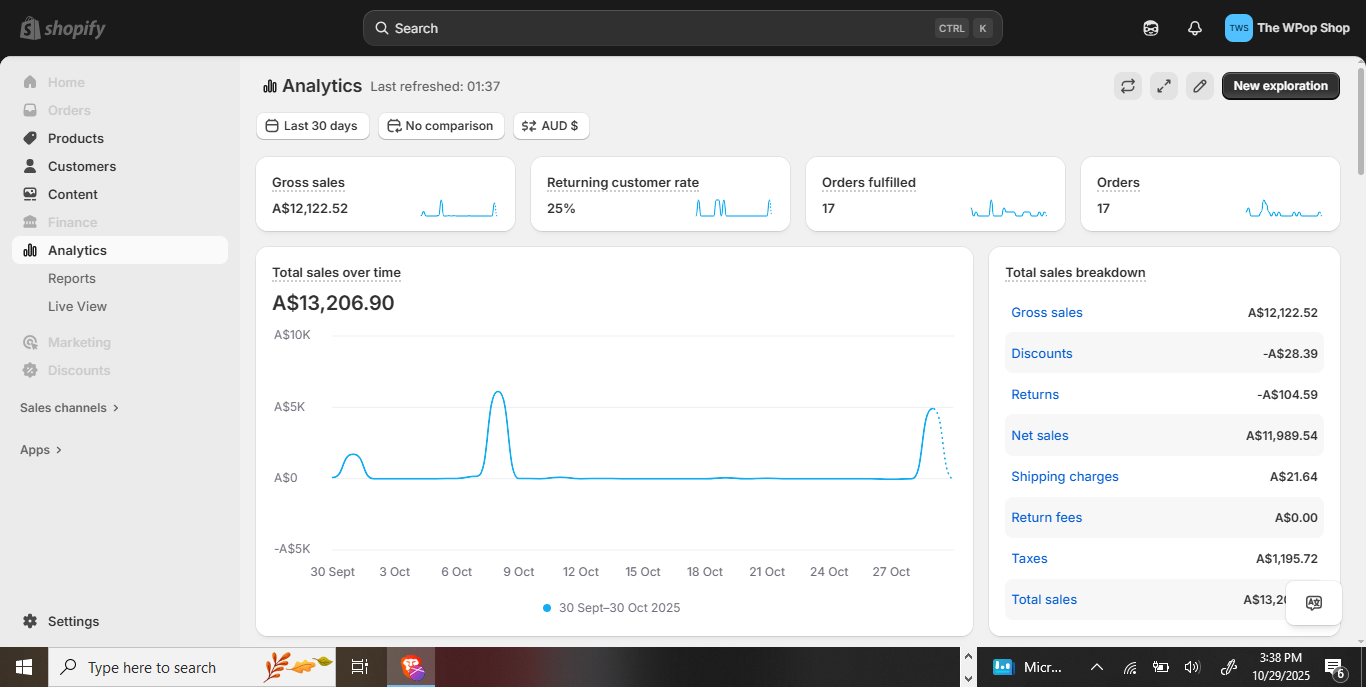
A · STORE SNAPSHOT
Sales snapshots across 30 days
This dashboard captures a 30-day trading window, showing gross sales, completed orders, returning-customer rate and a daily sales trend in Australian dollars. The breakdown separates discounts, returns, net sales, shipping and tax so the headline can be read in context.
What this view tells you
Read the selected date range and comparison labels in the screenshot before drawing conclusions. This is a snapshot shared by the store owner; it does not by itself establish what caused a change or guarantee that the same outcome will repeat.
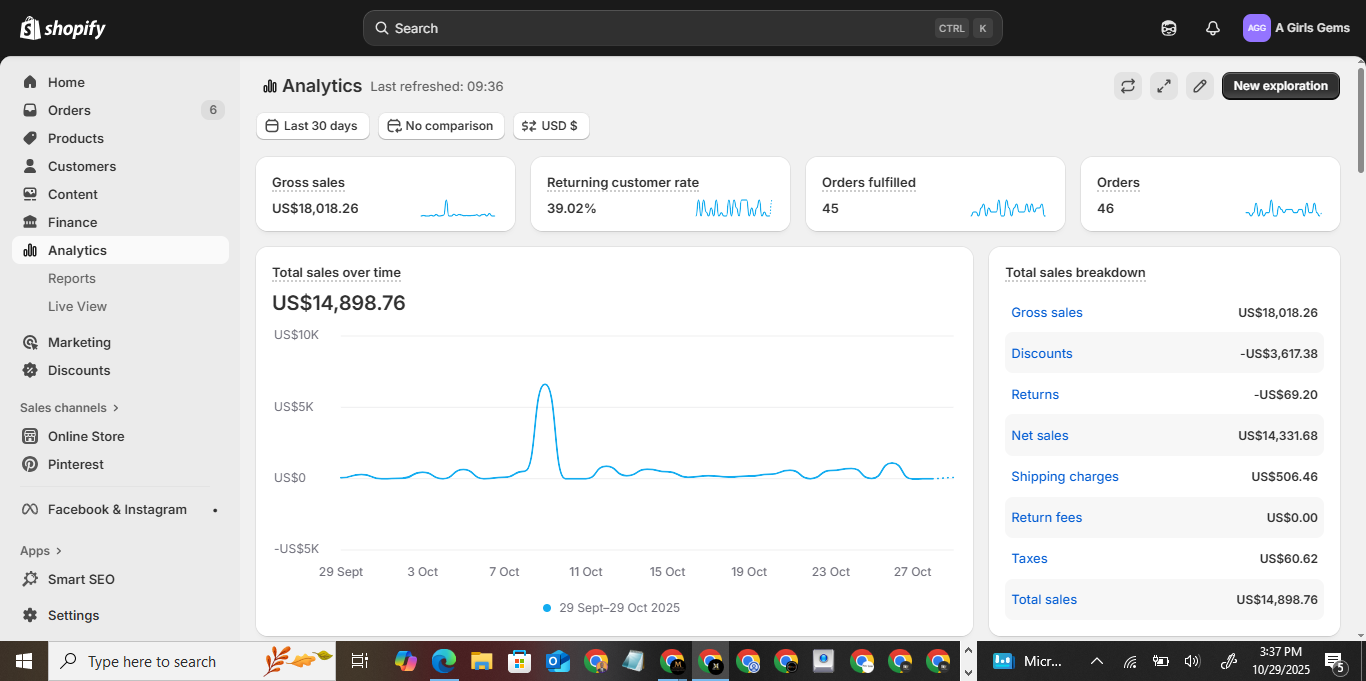
B · STORE SNAPSHOT
Sales and returning customers
A 30-day view pairs revenue and order totals with returning-customer rate. The sales breakdown makes discounts and returns visible alongside net sales, shipping and taxes—useful for reading more than the top-line number.
What this view tells you
Read the selected date range and comparison labels in the screenshot before drawing conclusions. This is a snapshot shared by the store owner; it does not by itself establish what caused a change or guarantee that the same outcome will repeat.
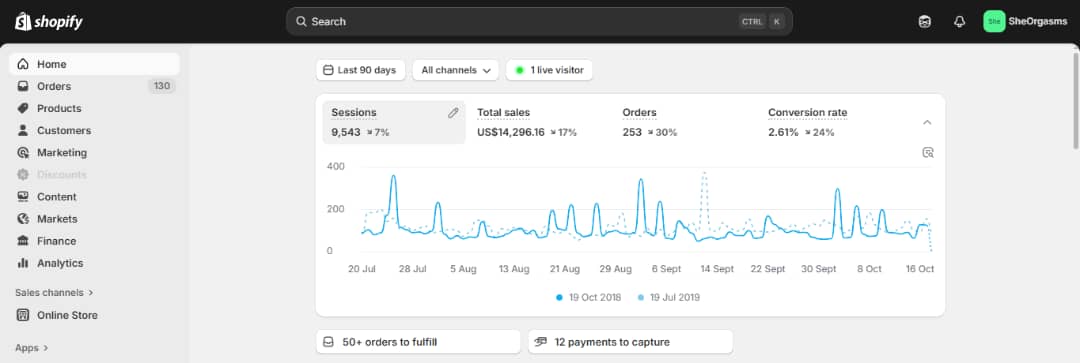
E · STORE SNAPSHOT
Orders and sales across a 90-day period
This snapshot combines sessions, total sales, orders and conversion rate across a 90-day window. The trend line shows activity across the period rather than relying on a single day’s result.
What this view tells you
Read the selected date range and comparison labels in the screenshot before drawing conclusions. This is a snapshot shared by the store owner; it does not by itself establish what caused a change or guarantee that the same outcome will repeat.
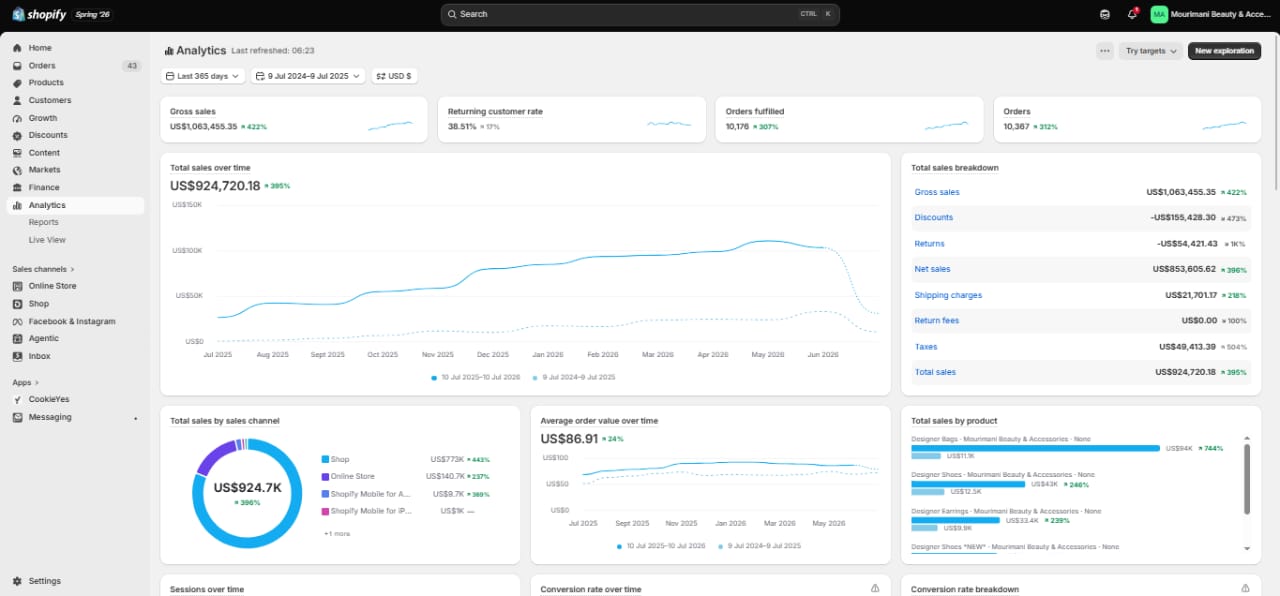
I · STORE SNAPSHOT
Year-long store performance
A 365-day snapshot with sales, fulfilled orders, returning-customer rate, channel contribution and average order value. The year-over-year comparison offers context for the longer-term direction shown in the dashboard.
What this view tells you
Read the selected date range and comparison labels in the screenshot before drawing conclusions. This is a snapshot shared by the store owner; it does not by itself establish what caused a change or guarantee that the same outcome will repeat.
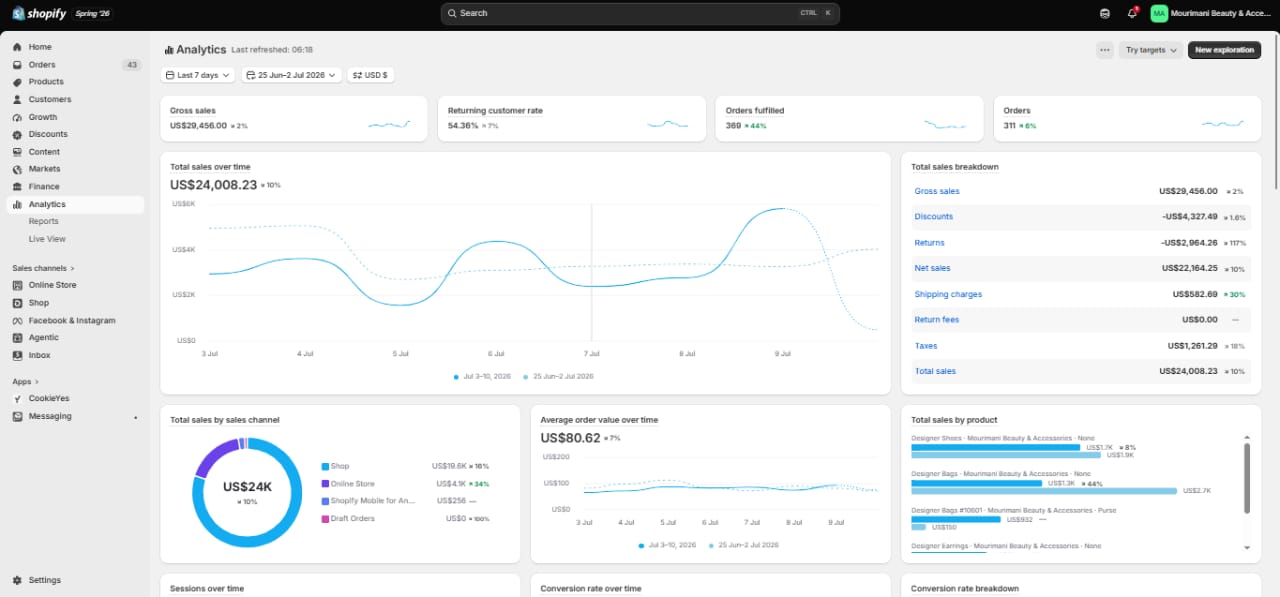
J · STORE SNAPSHOT
A closer look at a week of trading
This seven-day dashboard pairs sales and order totals with the daily trend, sales channels, product performance and average order value. Together these views show both overall movement and where sales are distributed.
What this view tells you
Read the selected date range and comparison labels in the screenshot before drawing conclusions. This is a snapshot shared by the store owner; it does not by itself establish what caused a change or guarantee that the same outcome will repeat.
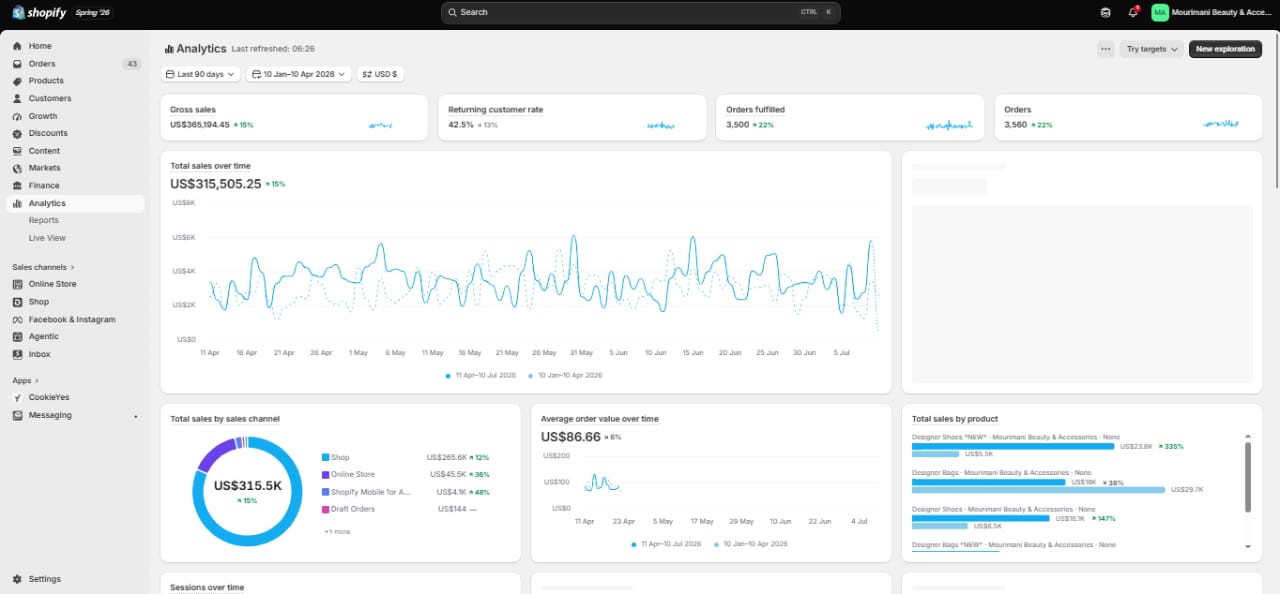
K · STORE SNAPSHOT
Quarterly sales and fulfilment signals
This 90-day snapshot combines total sales and order fulfilment with returning-customer rate and product-level information. The longer window helps make recurring patterns easier to distinguish from one-off spikes.
What this view tells you
Read the selected date range and comparison labels in the screenshot before drawing conclusions. This is a snapshot shared by the store owner; it does not by itself establish what caused a change or guarantee that the same outcome will repeat.
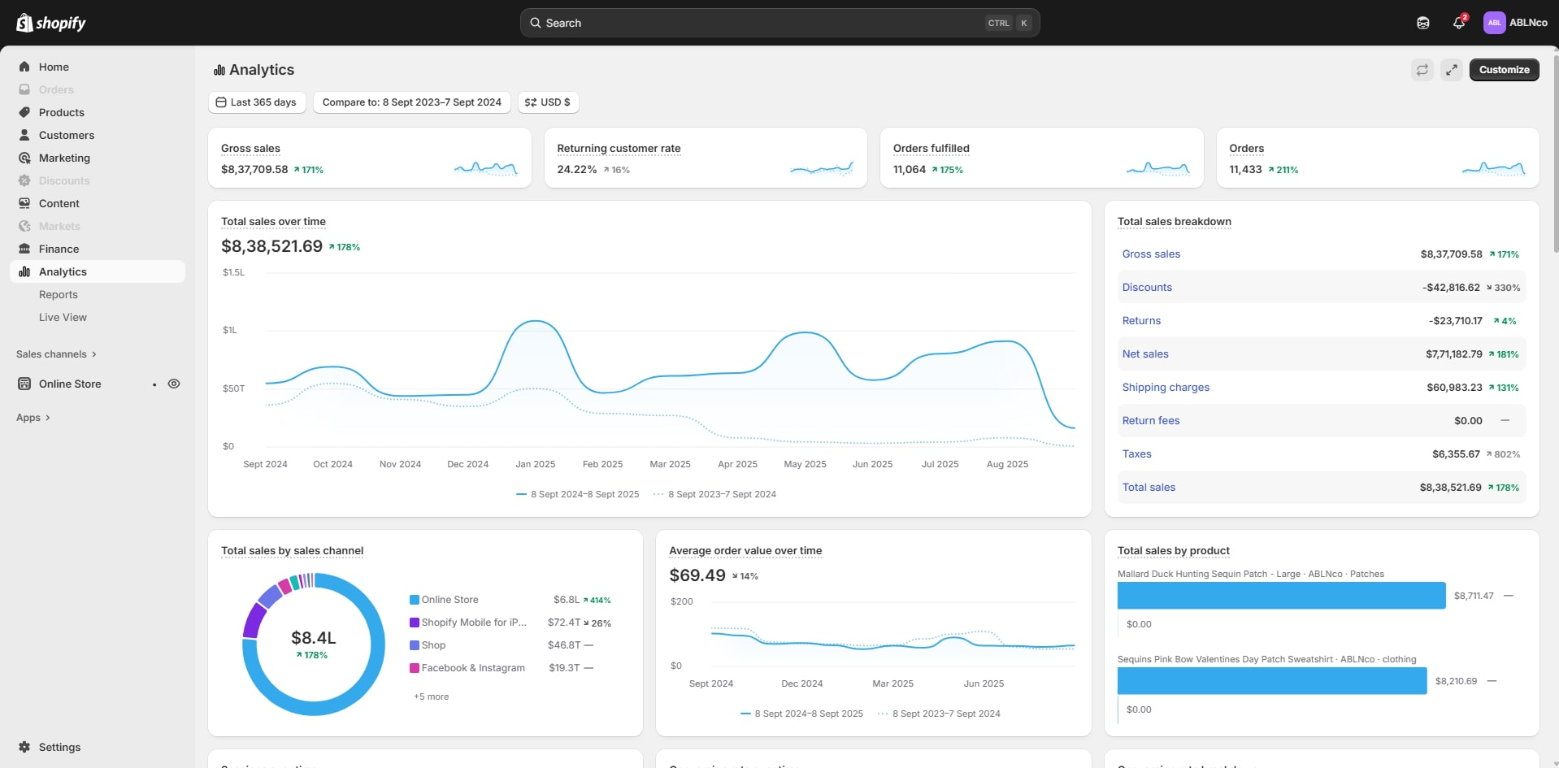
L · STORE SNAPSHOT
Year-over-year growth in context
A 365-day comparison of sales, orders, returning-customer rate and sales channels. The dashboard includes percentage changes against the comparison year; it is a store-reported snapshot rather than a promise of future performance.
What this view tells you
Read the selected date range and comparison labels in the screenshot before drawing conclusions. This is a snapshot shared by the store owner; it does not by itself establish what caused a change or guarantee that the same outcome will repeat.
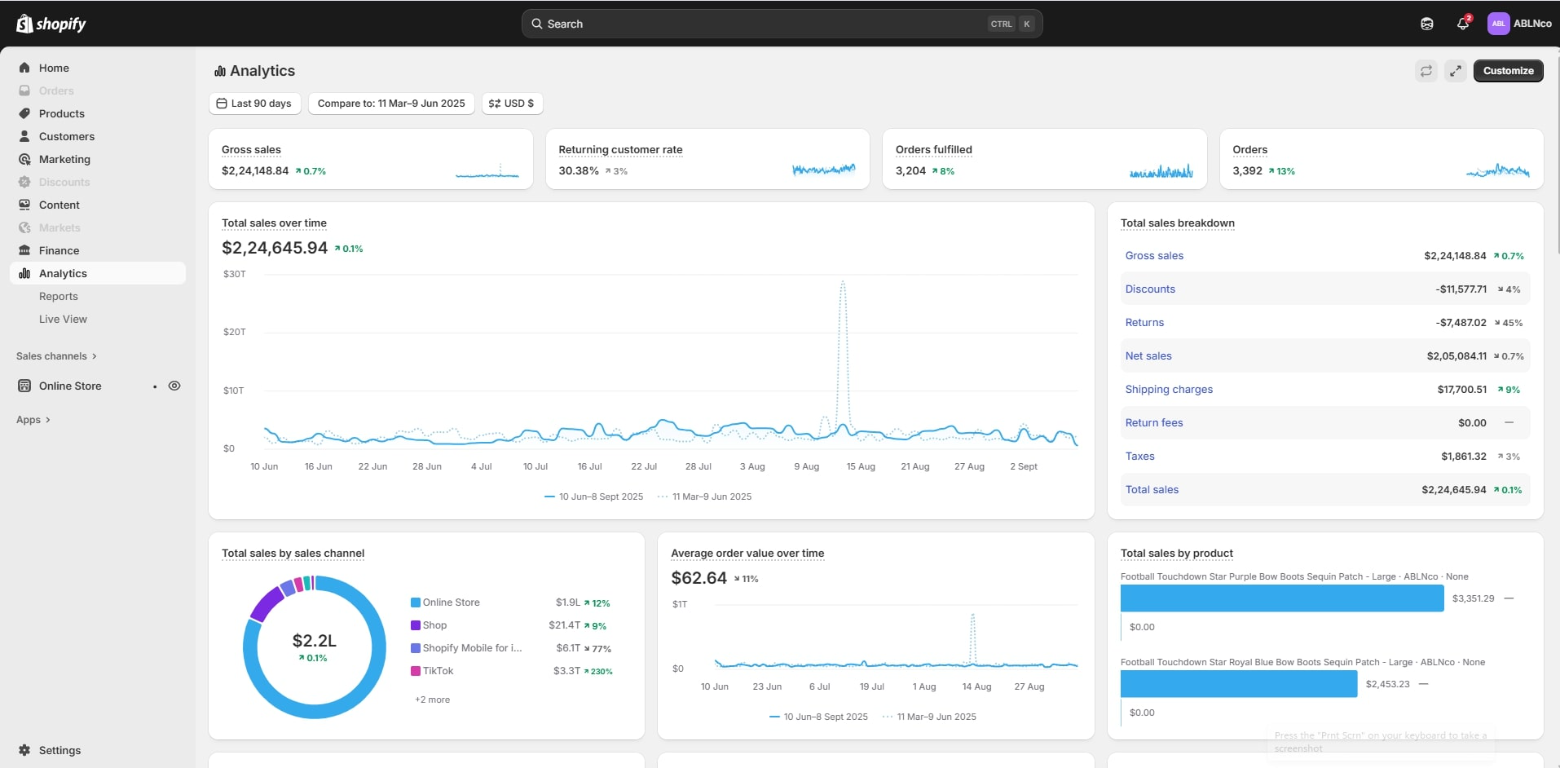
M · STORE SNAPSHOT
Quarterly sales comparison
This 90-day report compares sales with an earlier period and includes channel mix, average order value and leading products. It offers a broader view of how performance is distributed across the store.
What this view tells you
Read the selected date range and comparison labels in the screenshot before drawing conclusions. This is a snapshot shared by the store owner; it does not by itself establish what caused a change or guarantee that the same outcome will repeat.
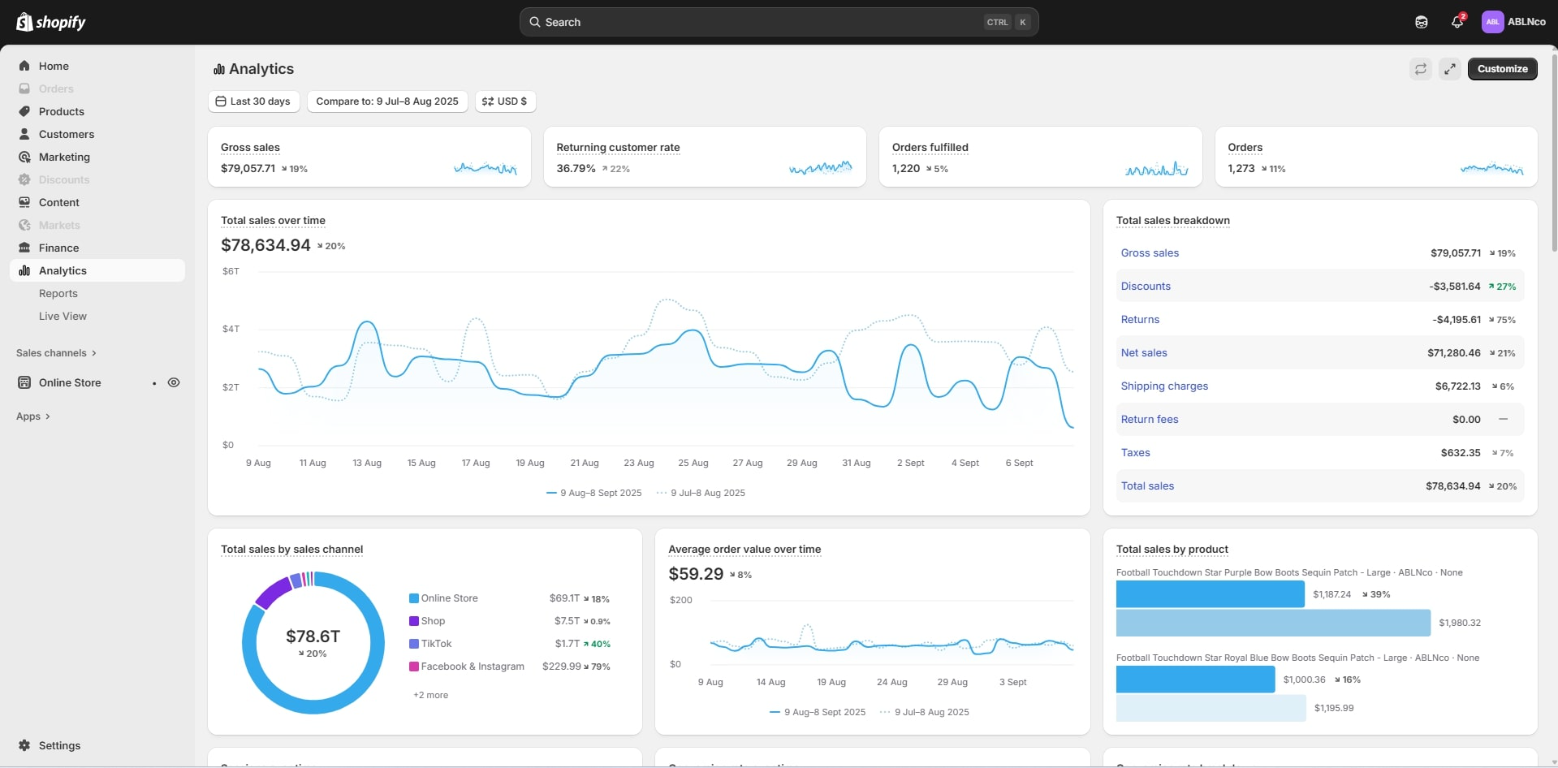
N · STORE SNAPSHOT
Month-to-month trading overview
A 30-day snapshot compared with the prior period, combining the sales trend, orders, channel mix, average order value and product performance. The comparison helps identify areas to investigate further.
What this view tells you
Read the selected date range and comparison labels in the screenshot before drawing conclusions. This is a snapshot shared by the store owner; it does not by itself establish what caused a change or guarantee that the same outcome will repeat.
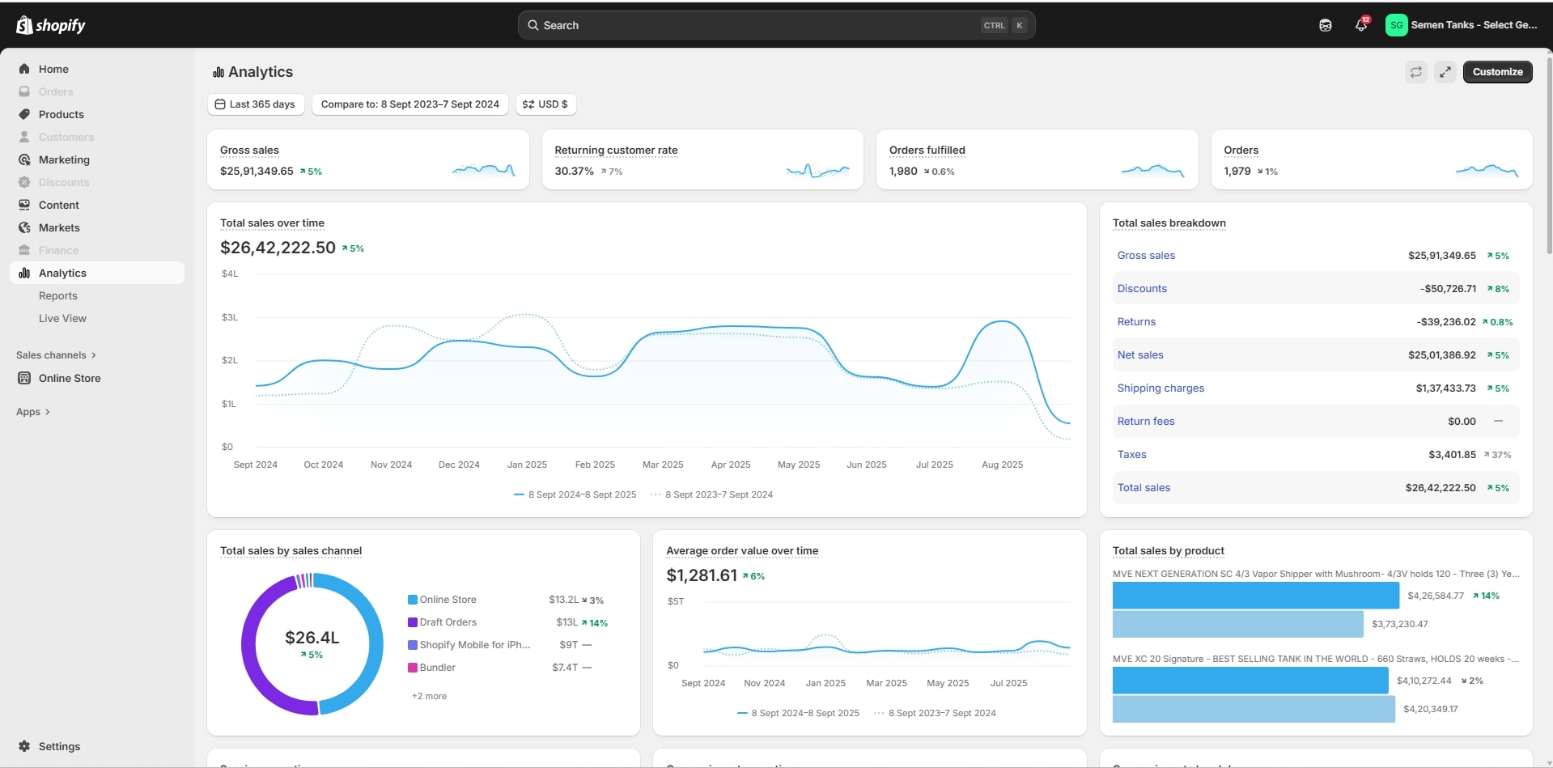
Q · STORE SNAPSHOT
Annual revenue and sales mix
This 365-day analytics snapshot combines sales, year-over-year comparison, sales channels, average order value and product contribution. The supporting breakdowns help explain the headline result.
What this view tells you
Read the selected date range and comparison labels in the screenshot before drawing conclusions. This is a snapshot shared by the store owner; it does not by itself establish what caused a change or guarantee that the same outcome will repeat.
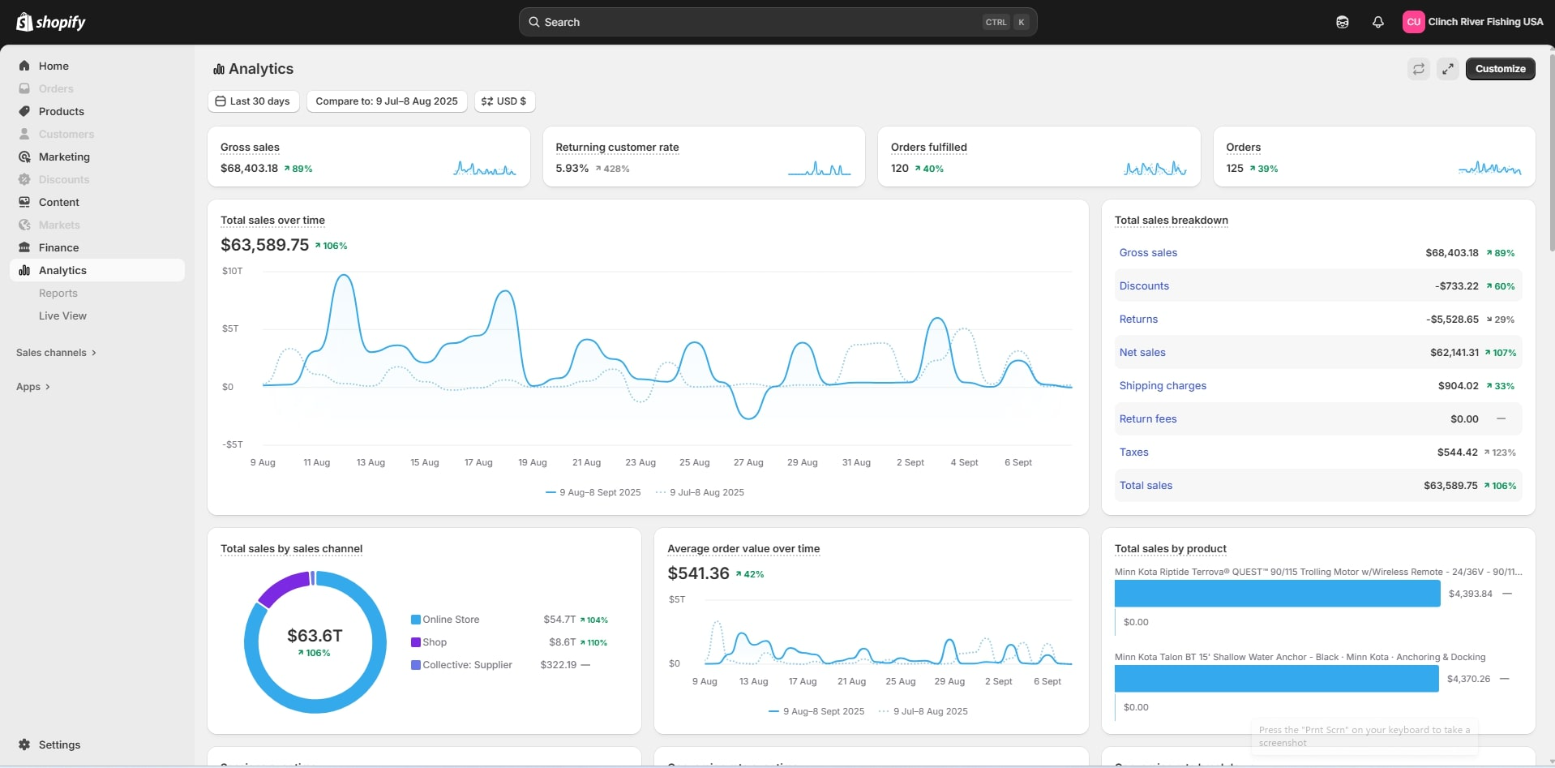
S · STORE SNAPSHOT
Recent sales and order momentum
A 30-day view of gross sales, orders and returning customers with a sales trend and breakdown. Product and channel panels add detail on what contributed to the period shown.
What this view tells you
Read the selected date range and comparison labels in the screenshot before drawing conclusions. This is a snapshot shared by the store owner; it does not by itself establish what caused a change or guarantee that the same outcome will repeat.
Traffic, conversion & customer journeys
Traffic, conversion & customer journeys
These views connect visits to shopping actions and completed orders, helping make the customer journey easier to understand.
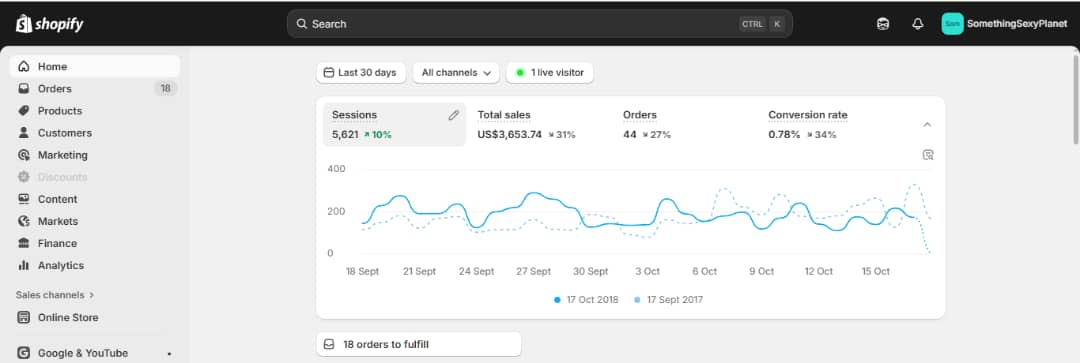
C · STORE SNAPSHOT
Store visits, sales and conversion
This overview brings sessions, total sales, orders and conversion rate into one view, with a comparison period shown on the trend chart. It helps connect visitor activity with completed purchases.
What this view tells you
Read the selected date range and comparison labels in the screenshot before drawing conclusions. This is a snapshot shared by the store owner; it does not by itself establish what caused a change or guarantee that the same outcome will repeat.
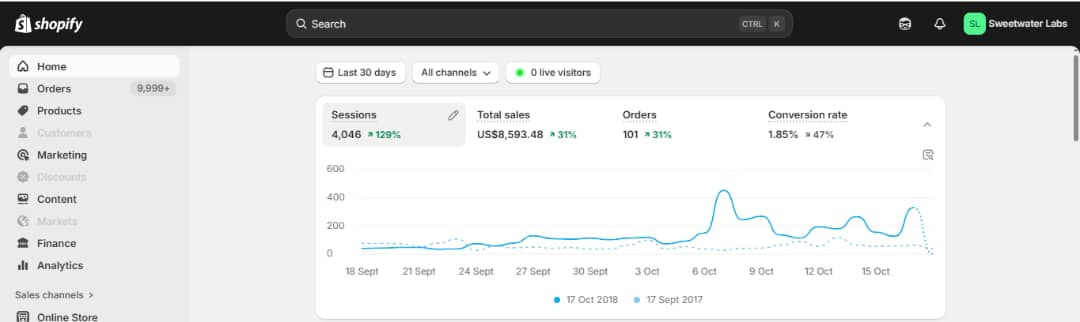
D · STORE SNAPSHOT
Traffic and conversion movement
A comparative 30-day dashboard view of sessions, sales, orders and conversion rate. The line chart gives context to daily movement, while the summary metrics make it easier to see whether traffic and purchase outcomes are moving together.
What this view tells you
Read the selected date range and comparison labels in the screenshot before drawing conclusions. This is a snapshot shared by the store owner; it does not by itself establish what caused a change or guarantee that the same outcome will repeat.
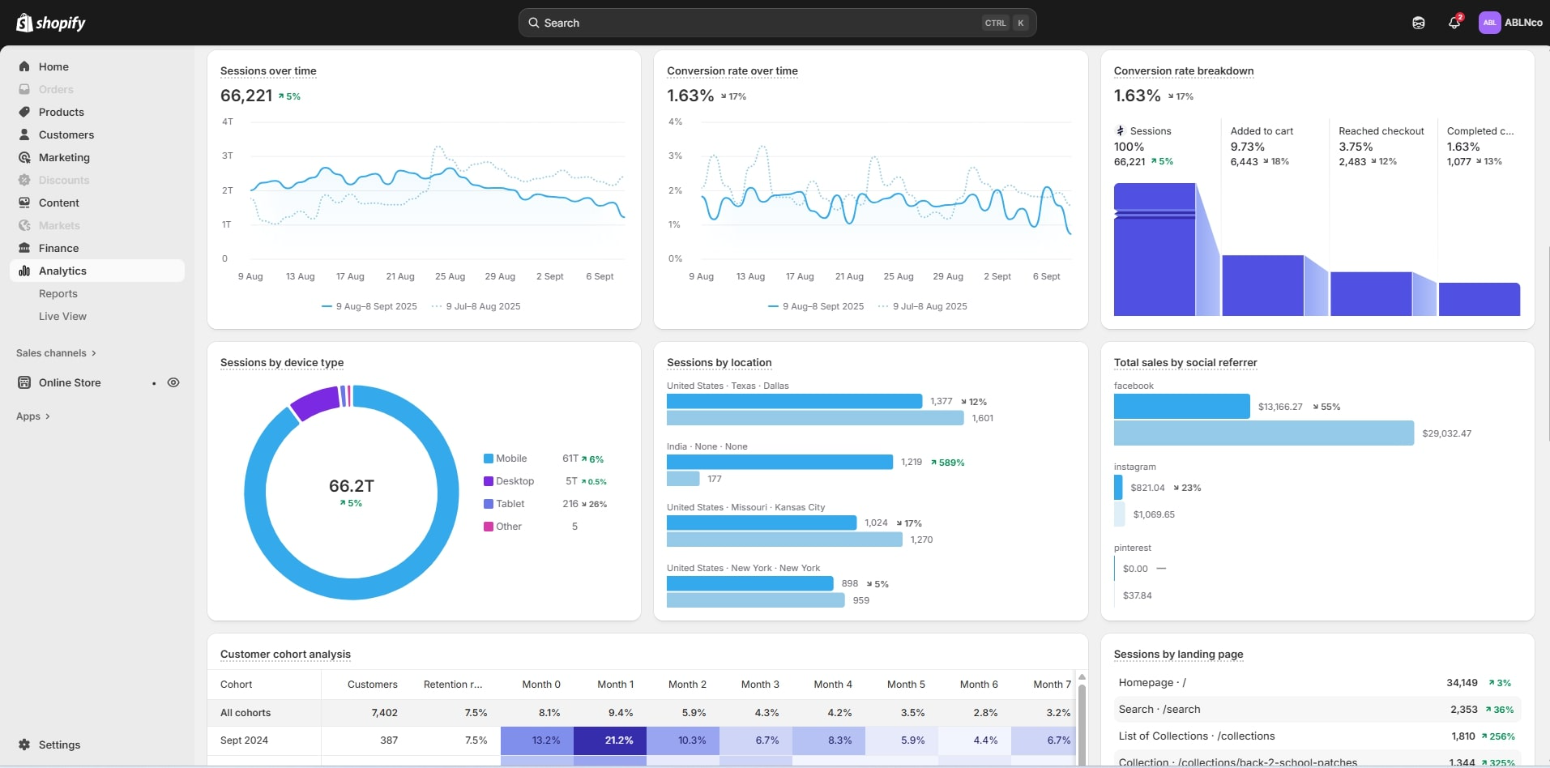
O · STORE SNAPSHOT
From sessions to customer actions
This analytics view connects traffic and conversion metrics with the funnel from sessions through add-to-cart, checkout and completed orders. It also shows device, location and social-referrer breakdowns, which can help inform where to focus optimisation.
What this view tells you
Read the selected date range and comparison labels in the screenshot before drawing conclusions. This is a snapshot shared by the store owner; it does not by itself establish what caused a change or guarantee that the same outcome will repeat.
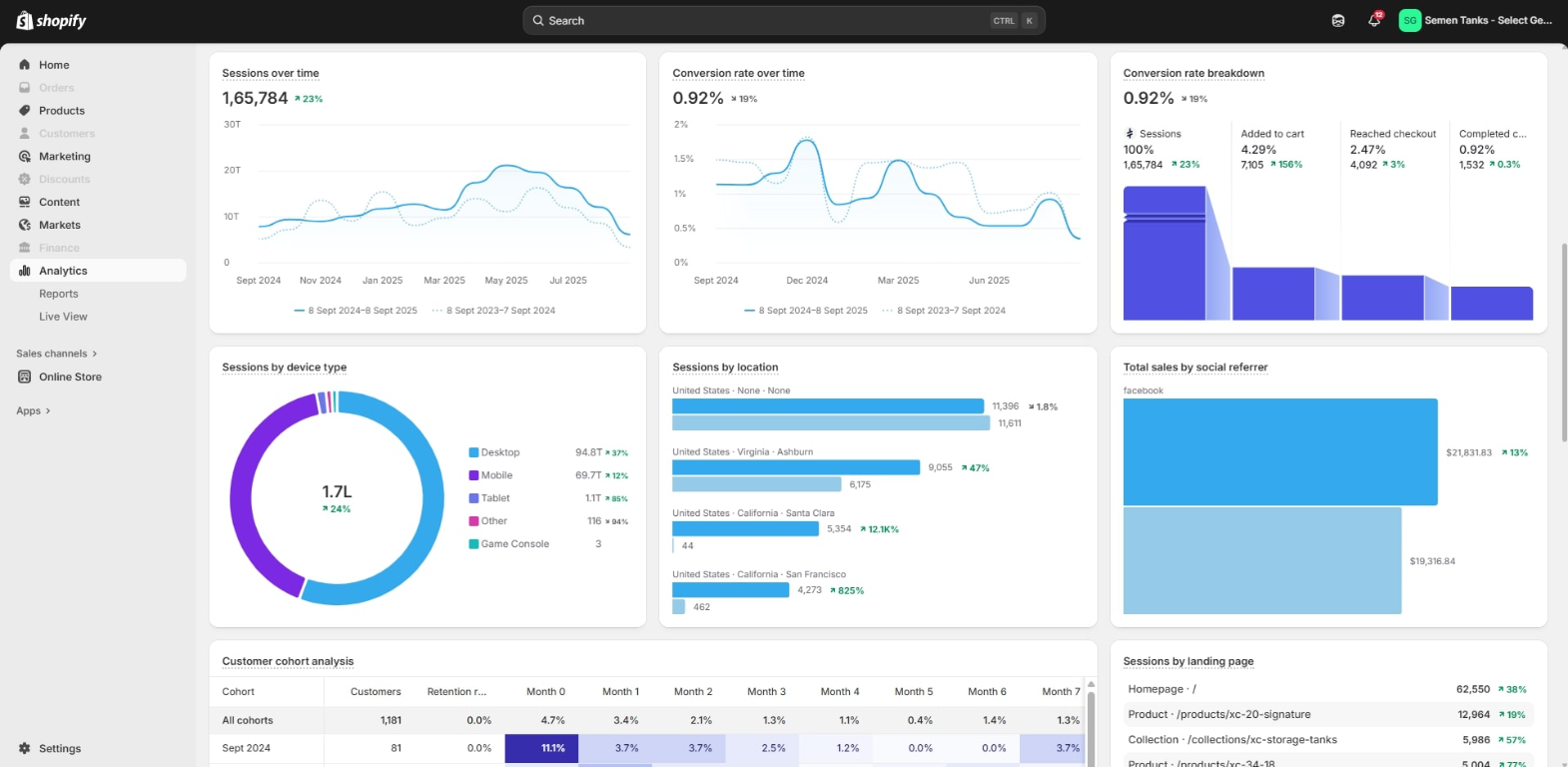
R · STORE SNAPSHOT
Understanding the conversion funnel
This dashboard brings sessions, conversion rate, add-to-cart, checkout and completed-checkout data together, with device, location and referral views. It makes the stages between a visit and a purchase easier to inspect.
What this view tells you
Read the selected date range and comparison labels in the screenshot before drawing conclusions. This is a snapshot shared by the store owner; it does not by itself establish what caused a change or guarantee that the same outcome will repeat.
Daily & weekly operating views
Daily & weekly operating views
Shorter reporting windows can help teams monitor current activity. They are most useful when considered alongside longer-term trends.
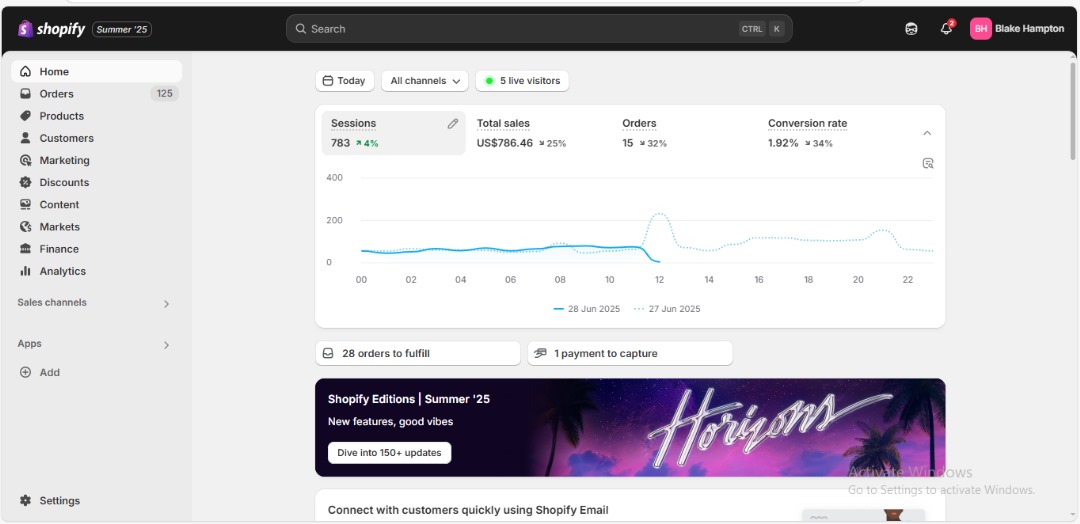
F · STORE SNAPSHOT
Daily store activity at a glance
A one-day dashboard view showing sessions, sales, orders and conversion rate alongside the prior-day comparison. It is a useful example of short-term monitoring, not a substitute for a longer trend.
What this view tells you
Read the selected date range and comparison labels in the screenshot before drawing conclusions. This is a snapshot shared by the store owner; it does not by itself establish what caused a change or guarantee that the same outcome will repeat.
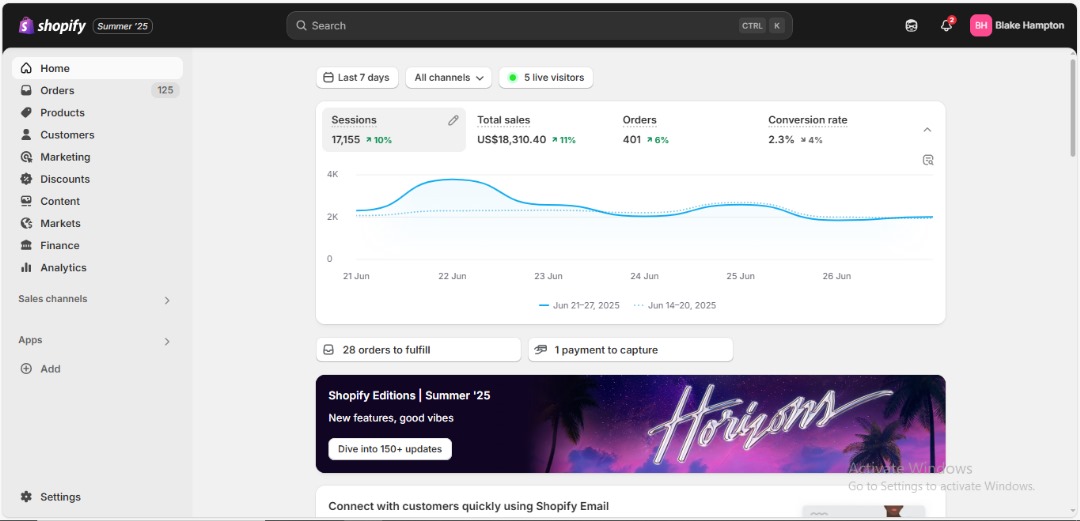
G · STORE SNAPSHOT
Week-long traffic and sales trends
This seven-day view tracks sessions, sales and orders against a comparison period. It shows how activity varied through the week and places the selected period alongside the previous one.
What this view tells you
Read the selected date range and comparison labels in the screenshot before drawing conclusions. This is a snapshot shared by the store owner; it does not by itself establish what caused a change or guarantee that the same outcome will repeat.
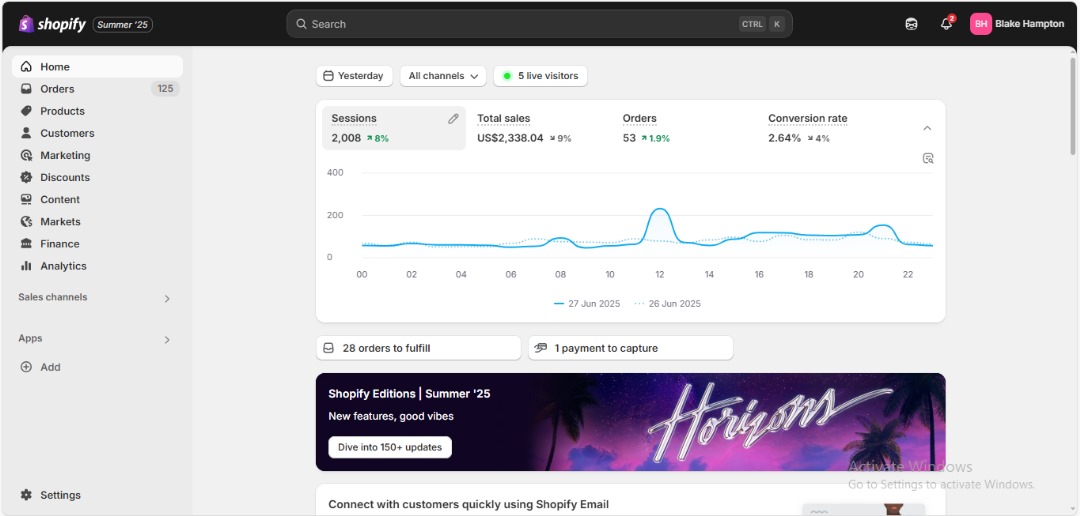
H · STORE SNAPSHOT
A daily pulse check
A daily view of sessions, sales, orders and conversion rate with a previous-day comparison. The chart helps put a day’s change into perspective across the trading hours.
What this view tells you
Read the selected date range and comparison labels in the screenshot before drawing conclusions. This is a snapshot shared by the store owner; it does not by itself establish what caused a change or guarantee that the same outcome will repeat.
Audience reach over time
Audience reach over time
Visitor and session reports provide context about how many people are reaching a store and how that audience changes over time.
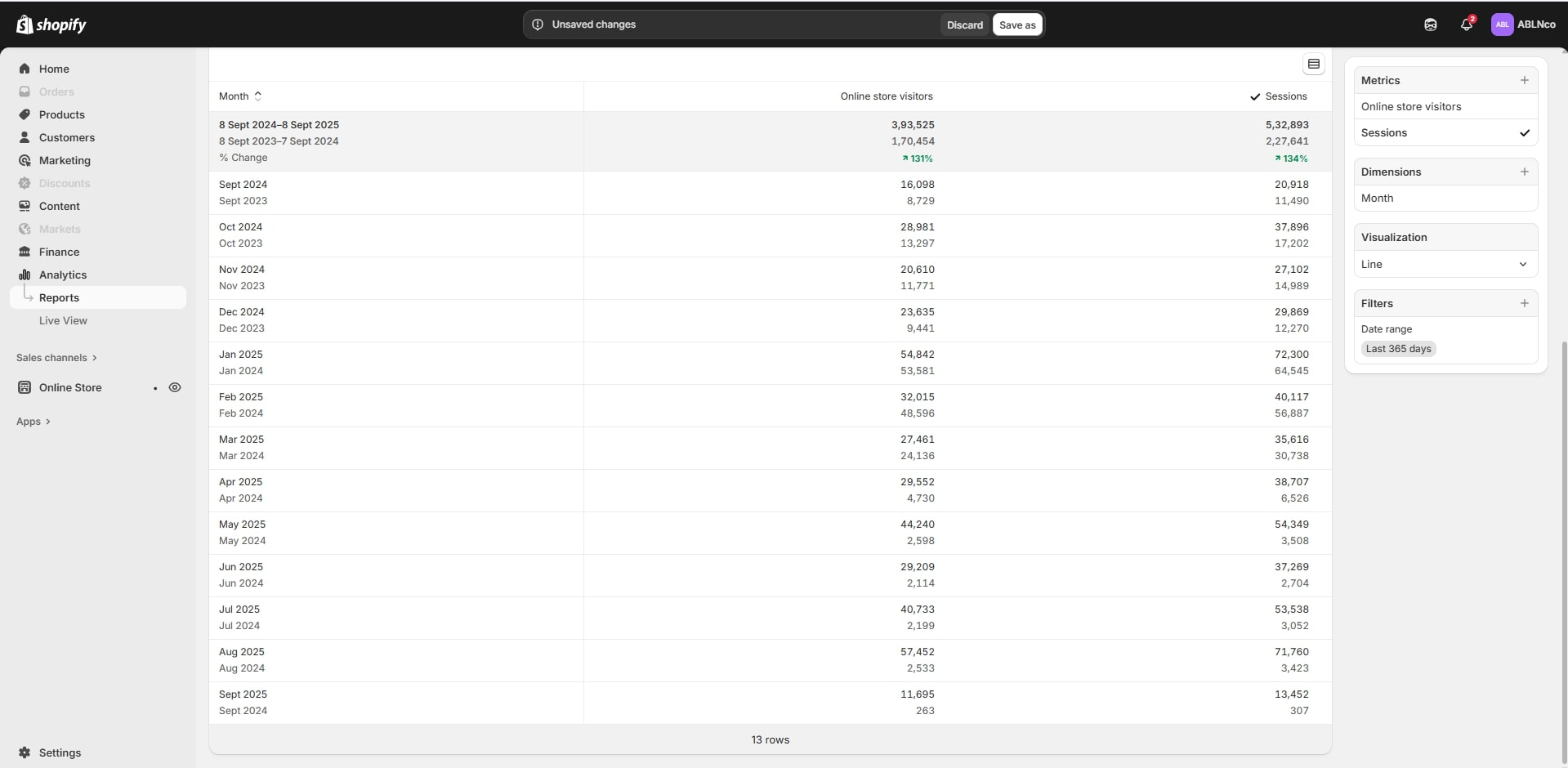
P · STORE SNAPSHOT
Visitor and session growth over time
A monthly table comparing online-store visitors and sessions across consecutive years. The month-by-month format helps reveal how audience reach changed over time and avoids reducing a year’s activity to a single total.
What this view tells you
Read the selected date range and comparison labels in the screenshot before drawing conclusions. This is a snapshot shared by the store owner; it does not by itself establish what caused a change or guarantee that the same outcome will repeat.
Your next step
Want a clearer picture of your store’s potential?
We can review your storefront, customer journey and operational setup, then discuss practical opportunities that fit your business.
Request a free store reviewWe’re also preparing something new: visit Fatisco Marketplace for updates ↗.